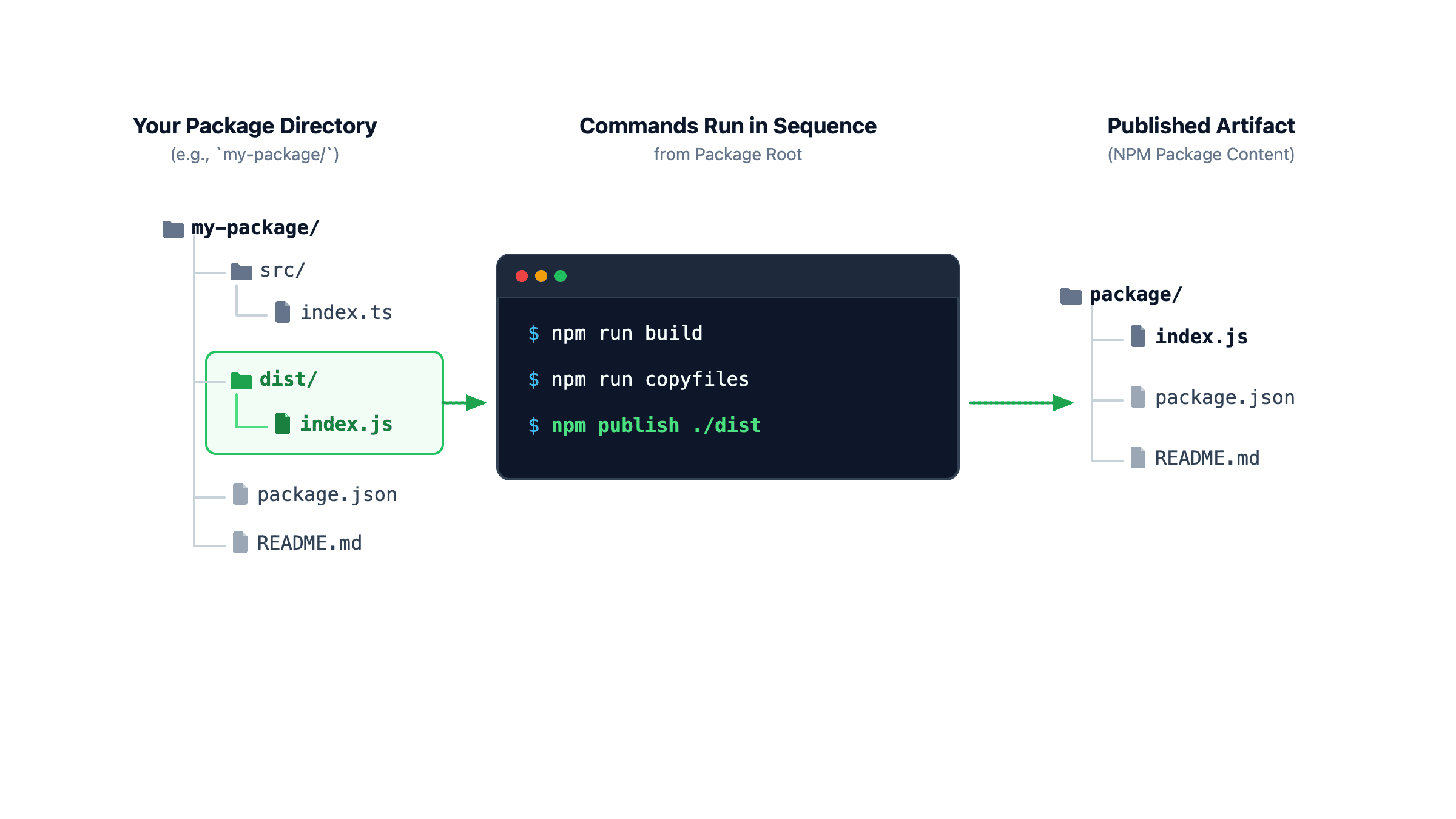
npm publish ./dist you need to prepare the files in ./dist (as detailed in this post)One detail that has always bugged me about publishing a package to NPM is how build output paths like dist/ can leak into the public API.
Turns out, npm publish can do it, but to make it work seamlessly in a real-world project, you need a few extra pieces in place. Let me walk you through how it works.
~
The Need: Clean imports without leaking implementation details
When authoring a package, you typically have a directory layout like this:
my-package/
├── src/
│   └── index.js
├── dist/
│   └── index.js
├── package.json
└── README.md
Source code lives in src/, while your a build step typically spits out the distribution files into a dist/ or build/ folder. Or if your package has no build step, because you authored an ES Module in JavaScript, you can even ship src/ as-is. This detail can leak into your public API, which is something you generally want to avoid, especially when loading the files from a CDN.
For example, the very first version of my ie-page-transitions package — which has no build step — shipped the src folder as part of the package structure.
my-package/
├── src/
│   ├── ie-page-transitions.css
│   ├── ie-page-transitions.mpa.js
│   ├── ie-page-transitions.shared.js
│   └── ie-page-transitions.spa.js
├── package.json
└── README.md
To users that use NodeJS (or a bundler) this detail is not visible, thanks to the exports field in the package.json.
{
  "name": "ie-page-transitions",
  "version": "0.0.1",
  …
  "exports": {
    "./spa": "./src/ie-page-transitions.spa.js",
    "./mpa": "./src/ie-page-transitions.mpa.js",
    "./shared": "./src/ie-page-transitions.shared.js",
    "./css": "./src/ie-page-transitions.css"
  },
  …
}
When using NodeJS, users can just import the files straight from the package without needing to know the files live in the ./src folder. For example, the CSS can be imported as follow:
import styles from 'ie-page-transitions/css' with { type: "css" };But for users loading the package from a CDN, it’s a different story. When loading the package from a CDN like jsDelivr, users needed to import the files from locations that all include that src folder. That same CSS file for example needs to be loaded from this location:
https://cdn.jsdelivr.net/npm/ie-page-transitions@0.0.1/src/ie-page-transitions.cssI don’t like this, because having src/ (or dist/ or build/) in public import paths is an implementation detail that leaked into the public API. It looks clunky, exposes the internal folder structure, and is just annoying to type.
I’m not the only one here. A quick search tells me that developers have been asking about this for more than 10 years by now. PNPM actually supports a publishConfig.directory setting in the package.json file to achieve this, but stock NPM doesn’t.
~
The Solution: npm publish ./folder
For my last three packages (hic-pageflip, mermaid-element, and rich-input), which all build their source into a ./dist folder, I’ve been using a little trick to publish only the contents of the dist folder to NPM. This makes the import paths clean and direct. For example, for hic-pageflip, when loading from a CDN like jsDelivr, it does not include dist/-part in the URL:
import { PageFlip } from 'https://cdn.jsdelivr.net/npm/hic-pageflip';To achieve this, I used a lesser-known capability of the npm CLI: npm publish accepts a folder path as an argument.
npm publish ./distWhen you pass a folder path to npm publish, npm doesn’t package the current working directory. Instead, it treats that target folder as the package root.
Whatever is inside ./dist will be placed directly at the top level of the tarball uploaded to the registry.
For this to work, you do need some extra preparation, but it’s worth it. Let me walk you through how it works.
💁♂️ “What about just reorganizing the project to not have a dist folder at all?”
A workaround I’ve seen developers use — see the invokers polyfill as an example — is leaving all source files in the project root and dumping build output directly into that same project root. While that works, I believe that creates a mess: compiled .js, .d.ts, and .map files sit right alongside your dotfiles, test configurations, and source files, cluttering git and your working directory.
What you really want is simple: keep the actual source code in ./src and keep ./dist for build outputs, but have the contents of ./dist become the root of the package when published to NPM.
~
Making It Work: The Missing Pieces
In order to publish the dist folder, there are two main things you need to do once your project has been built:
- Copy other necessary package files (
package.json,README.md,LICENSE, etc.) into./dist. - Rewrite the
package.jsonin./distso its paths match the new root (and optionally remove thescriptsfrom that file as well).
Let’s look at both steps.
~
1. Copy files you want to package into ./dist
Because npm publish ./dist treats ./dist as the package root and ignores everything outside of it, that folder needs to contain all the metadata files required for a valid package alongside your built code:
package.json(so npm knows your package name, version, dependencies, and entry points).README.md(so npmjs.com displays your documentation).LICENSE(so npm recognizes your license and consumers stay legally safe).
Since all of these typically live in your project root, you need to copy them into ./dist after building. You can also include other files if you want, of course.
~
2. Rewrite the package.json in ./dist
Simply copying your root package.json into ./dist as-is won’t work — the package.json in the build folder needs to be adjusted.
In your root package.json, your entry points typically include the ./dist/ prefix:
{
  "name": "my-package",
  "version": "1.0.0",
  "main": "./dist/index.js",
  "module": "./dist/index.js",
  "exports": {
    ".": "./dist/index.js",
    "./submodule": "./dist/submodule.js"
  }
}
If you copy that package.json as-is into ./dist and publish it, everything breaks because for published package, the root is the contents of ./dist itself.
So the paths in the file ./dist/package.json must be rewritten relative to the new root:
{
  "name": "my-package",
  "version": "1.0.0",
  "main": "./index.js",
  "module": "./index.js",
  "exports": {
    ".": "./index.js",
    "./submodule": "./submodule.js"
  }
}
~
The Code: Assembling ./dist
Rather than manually copying files and re-mapping every single export field by hand, you can automate both steps in a small Node.js script. For the package.json adjustments, a quick string replace does the trick: take your root package.json, strip out internal scripts, and replace ./dist/ with ./.
Here’s a clean, zero-dependency Node.js script (scripts/postbuild.js) that does the heavy lifting:
import fs from 'node:fs';
import path from 'node:path';
import { fileURLToPath } from 'node:url';
const __filename = fileURLToPath(import.meta.url);
const __dirname = path.dirname(__filename);
const rootDir = path.resolve(__dirname, '..');
const distDir = path.join(rootDir, 'dist');
const srcDir = path.join(rootDir, 'src');
console.log('Preparing ./dist package...');
// 1. Clean and recreate the dist directory (if not already handled by your bundler)
fs.rmSync(distDir, { recursive: true, force: true });
fs.mkdirSync(distDir, { recursive: true });
// 2. Copy compiled/source files into dist/
fs.cpSync(srcDir, distDir, { recursive: true });
// 3. Copy essential metadata files from root to dist/
const filesToCopy = ['README.md', 'LICENSE'];
for (const file of filesToCopy) {
const srcPath = path.join(rootDir, file);
if (fs.existsSync(srcPath)) {
fs.copyFileSync(srcPath, path.join(distDir, file));
}
}
// 4. Prepare and rewrite package.json for dist/
const pkgPath = path.join(rootDir, 'package.json');
if (fs.existsSync(pkgPath)) {
const pkg = JSON.parse(fs.readFileSync(pkgPath, 'utf8'));
// Strip scripts so consumers don't get internal build/test scripts
delete pkg.scripts;
// Replace ./dist/ with ./ so all paths point to the root of the published package
const distPkgContent = JSON.stringify(pkg, null, 2).replaceAll('./dist/', './') + 'n';
// Write out the tailored package.json to dist/
fs.writeFileSync(
path.join(distDir, 'package.json'),
distPkgContent,
'utf8'
);
}
console.log('Successfully prepared ./dist for publishing!');
You can (and should) set this up as a postbuild step in your root package.json so that it automatically runs every time npm run build finishes:
{
  "scripts": {
    "build": "…",
    "postbuild": "node scripts/postbuild.js"
  }
}
Now, every time you run npm run build, the files and code in ./dist end up as a self-contained, publication-ready package.
~
# Safeguarding Against Muscle Memory: Prevent npm publish from running
Typically, when authoring a package that has a build step, you have npm run build execute in a prepublishOnly task in your package.json:
{
  "scripts": {
    "build": "…",
    "postbuild": "node scripts/postbuild.js",
    "prepublishOnly": "npm run build"
  }
}
That way, every time you run npm publish, npm automatically builds the project first before publishing.
However, with our subfolder setup, there’s a big catch here: developer muscle memory.
When you’re ready to ship an update and instinctively type npm publish into your terminal, npm will dutifully run prepublishOnly and execute npm run build … but then it’s still gonna try and publish the project root instead of ./dist … uh-oh!
To prevent this from ever happening, you can repurpose prepublishOnly into a safeguard and combine it with a dedicated publish script (npm run pub) that runs npm run build before calling npm publish ./dist.
In your root package.json:
{
  "scripts": {
    "build": "…",
    "postbuild": "node scripts/postbuild.js",
    "prepublishOnly": "if [ -z $PUBLISH ]; then echo 'n🛑 ERROR: This package must be published using `npm run pub`n' && exit 1; fi",
    "pub": "PUBLISH=true npm run build && npm publish ./dist"
  }
}
The trick here is the $PUBLISH environment variable. When you run npm publish directly, $PUBLISH is not set, and the script simply exits — preventing npm publish from running.
In the pub script (invoked via npm run pub), $PUBLISH gets explicitly set to true, which allows the build and npm publish ./dist to go through without being blocked.
This setup is simple, elegant, and completely foolproof 🙂
~
Testing Your Publish: Dry Runs and Tarballs
Before you publish a package to the live registry for the first time with this setup, don’t just push it and hope for the best. Test it locally first.
Here are two essential commands to verify your setup:
1. Perform a dry run with npm publish ./dist --dry-run
You can run npm publish with the --dry-run flag pointing to your folder:
npm publish ./dist --dry-runThis runs the entire publishing pipeline — tarball creation, file filtering, checksum generation — without actually uploading anything to NPM.
It outputs a detailed manifest of everything that will be shipped:
npm notice === Tarball Contents ===
npm notice 1.1kB  LICENSE
npm notice 1.8kB  README.md
npm notice 850B   index.js
npm notice 1.2kB  package.json
npm notice 4.2kB  core/engine.js
npm notice === Tarball Details ===
npm notice name:          hic-pageflip
npm notice version:       1.0.1
npm notice filename:      hic-pageflip-1.0.1.tgz
npm notice package size:  3.2 kB
npm notice unpacked size: 9.1 kB
npm notice total files:   5
Look closely at that file list: notice how index.js, README.md, and LICENSE are all sitting right at the root, with no dist/ prefix in sight? That’s your confirmation that the subfolder structure is working as intended.
~
2. Inspect the created tarball with npm pack
The previous step already generates the tarball for publishing. You can also run npm pack on its own to generate a local tarball (e.g. my-package-1.0.0.tgz) for inspection.
# Be sure to run npm run build first
npm pack ./dist
You can then extract and inspect the contents of the generated tarball:
tar -xzf my-package-1.0.0.tgz ./my-package-1.0.0Now you’ll see the contents of ./dist sitting right in the folder ./my-package-1.0.0 which confirms that the package was correctly packaged and is ready for publishing.
~
In Closing
Publishing a subfolder instead of your repository root is one of those small tweaks that, I think, makes for a better package, without much added complexity. I’ve successfully used this pattern in multiple projects, including hic-pageflip and rich-input.
It feels a bit stupid that NPM does not have this functionality built in, especially since developers have been asking about this for more than 10 years by now. A new publishDirectory field in the package.json that instructs npm publish to publish that specific subfolder would be welcome here. PNPM has this (publishConfig.directory), and I think it’s long overdue for NPM to support this as well …
Until then, you can use the pattern I detailed here in this post 🙂
~
Spread the word
Feel free to reshare this post on social media to help spread the word:
~
🔥 Like what you see? Want to stay in the loop? Here's how:
I can also be found on 𝕏 Twitter and 🐘 Mastodon but only post there sporadically.