When comparing Nuxt and Next.js, most articles repeat the same talking points: "Vue vs React," "SSR vs SSG," and "file-based routing."
But both frameworks have matured dramatically. The reality in 2025 is far more nuanced: they diverge in runtime philosophy, deployment portability, DX ergonomics, ecosystem depth — and they’re now evolving closer than ever, with NuxtLabs recently acquired by Vercel.
This guide takes a deeper, practical approach. We’ll explore the core differences, ecosystem shape, unique features (with real code), the impact of Vercel’s acquisition, benchmark realities, and use-case guidance.
Why You Need an Opinionated JavaScript Framework
Modern web development with React or Vue gives you enormous flexibility — but also a lot of responsibility. On their own, these libraries focus solely on building UI components. They don’t prescribe how to handle routing, data fetching, server-side rendering (SSR), code-splitting, or deployment.
As your project grows beyond a small SPA, stitching these pieces together becomes increasingly complex and error-prone.
That’s where Next.js (for React) and Nuxt (for Vue) come in. They’re opinionated, full-stack meta-frameworks designed to solve the "missing pieces" problem:
- File-based routing: so you don’t have to manually configure a router.
- SSR, SSG, ISR, and hybrid rendering: handled out of the box, improving SEO and initial load times.
- Common solutions are built-in: data fetching, middleware, image optimization, and API routes.
- Standardization: they standardize the project structure, which helps teams scale and onboard developers faster.
Next.js and Nuxt extend React and Vue from UI libraries into complete application frameworks.
They give you a structured, batteries-included environment that balances flexibility with convention — so you can focus on building features instead of reinventing infrastructure.
Core Comparison
Let's compare both frameworks in basic areas to have a better understanding of what they are:
| Feature | Nuxt | Next.js |
| Core | Vue 3 (Composition API) | React (Hooks, Server Components) |
| Rendering modes | SSR, SSG, SWR, ISR-like, Hybrid, Server Components | SSR, SSG, ISR, Streaming, Server Components |
| Build tool | Vite + Nitro runtime | Webpack (legacy), Turbopack, Babel |
| Deployment targets | Node, Edge, Serverless, Workers (via Nitro adapters) | Node, Edge, Serverless (best on Vercel) |
| Routing | File-based + dynamic params | File-based + dynamic params |
| Middleware | Global & per-route | Middleware API + Edge Middleware |
| Ecosystem size | Growing, curated | Vast, massive React ecosystem |
Let's dive into each of these points and explore why they matter.
Rendering Modes (SSR, SSG, ISR, CSR, Hybrid)
Rendering modes define where and when your pages are generated — and this choice has a huge impact on performance, scalability, SEO, and complexity.
- SSR (Server-Side Rendering): Pages are rendered on the server at request time. This improves SEO and reduces time-to-first-byte, but it can add server load.
- SSG (Static Site Generation): Pages are pre-rendered at build time, making them ultra-fast and cheap to serve. However, updating them requires a rebuild.
- ISR (Incremental Static Regeneration): Combines both: static pages can be regenerated in the background at runtime, giving you static speed with dynamic content freshness.
- CSR (Client-Side Rendering): Pages render entirely in the browser, reducing server overhead but often hurting SEO and initial load time.
- Hybrid Rendering: Next.js and Nuxt both support mixing these modes per route, so you can statically generate your marketing pages while rendering dashboards dynamically.
The key takeaway: mastering rendering strategies lets you balance performance, scalability, and developer velocity.
Build Tool (Webpack, Vite, Turbopack)
A build tool is what transforms your source code into optimized, production-ready assets — bundling, transpiling, and code-splitting along the way.
- Webpack has been the standard for years, but it’s considered legacy today. It’s powerful but slower due to its architecture and reliance on disk I/O.
- Vite (used by Nuxt 3) is much faster because it leverages ES modules and native browser features during development. Builds are quicker, hot module replacement is nearly instant.
- Turbopack is the next-generation bundler from Vercel (and the future default for Next.js). Written in Rust, it’s dramatically faster than Webpack and designed for large-scale apps.
The choice of build tool directly affects developer experience (build speed, feedback loops) and production performance (bundle size, tree-shaking).
Nitro Runtime (Nuxt)
Nitro is Nuxt’s secret weapon: a lightweight, universal server runtime that abstracts away deployment environments. Instead of building for Node.js alone, Nitro lets Nuxt apps run anywhere — AWS Lambda, Cloudflare Workers, Deno, Bun, Vercel Edge, or traditional servers — without configuration changes.
It also powers features like server API routes, server-side middleware, and on-demand rendering. This runtime decoupling is what makes Nuxt particularly flexible for modern architectures and edge-first deployments.
Edge & Workers
"Workers" refer to serverless compute units that run your code closer to the user — typically on edge networks like Cloudflare Workers, Vercel Edge Functions, or Deno Deploy.
Instead of responding from a single region, edge functions run globally, cutting latency and improving TTFB. They’re ideal for lightweight tasks: authentication, redirects, A/B testing, or personalization.
Next.js and Nuxt can both run middleware and sometimes even entire SSR responses at the edge. This is increasingly how modern web apps achieve near-instant responses at scale.
File-Based Routing & Dynamic Parameters
Both frameworks use file-based routing, which automatically maps your directory structure to routes — no manual route configuration required. For example:
pages/
  about.vue → /about
  blog/[slug].vue → /blog/:slug
Dynamic parameters like [slug] or [id] let you define routes for dynamic content (e.g., blog posts, products) with minimal boilerplate. Combined with automatic prefetching and nested layouts, this routing model removes a lot of manual work and keeps your project organized.
Middleware: What It Does and Where It Lives
Middleware is code that runs between the incoming request and the final response. It’s perfect for tasks like authentication, redirects, analytics, geolocation, and A/B testing.
- Server Middleware: Runs before your API or SSR logic, often used for security, logging, or request rewriting.
- Per-Route Middleware: Applied to specific pages or APIs. Useful for requiring authentication on protected routes without impacting public pages.
- Edge Middleware: Runs on the CDN edge, often before your app even hits a server. This is ideal for ultra-low-latency operations like geolocation-based routing or feature flagging.
Middleware helps you build smarter, more secure, and more personalized applications — and choosing where it runs (server vs. edge vs. route) is part of optimizing performance and cost.
Performance Benchmark
In a benchmark comparing SSR frameworks by Pau Sanchez, Next.js and Nuxt were tested rendering a simple "Hello World" page, a component, and fetching data from a local API.
| Case | Nuxt | Next |
| Simple Page ("Hello World") | ~1,376 req/s | ~2,570 req/s |
| With a Component | ~1,447 req/s | ~2,794 req/s |
| Fetching from Local API | ~947 req/s | ~388 req/s |
These results highlight that Next.js generally handles more requests per second in simple SSR scenarios, while Nuxt performs better under API-fetching workloads in this specific benchmark.
Next.js tends to excel in throughput for static and component-heavy pages, whereas Nuxt remains competitive, particularly when integrating asynchronous data fetching.
Read our other articles to learn how to optimize Next.js apps and how to make your Nuxt site fast.
Ecosystem
Let’s take a look at the NPM downloads and GitHub stars:
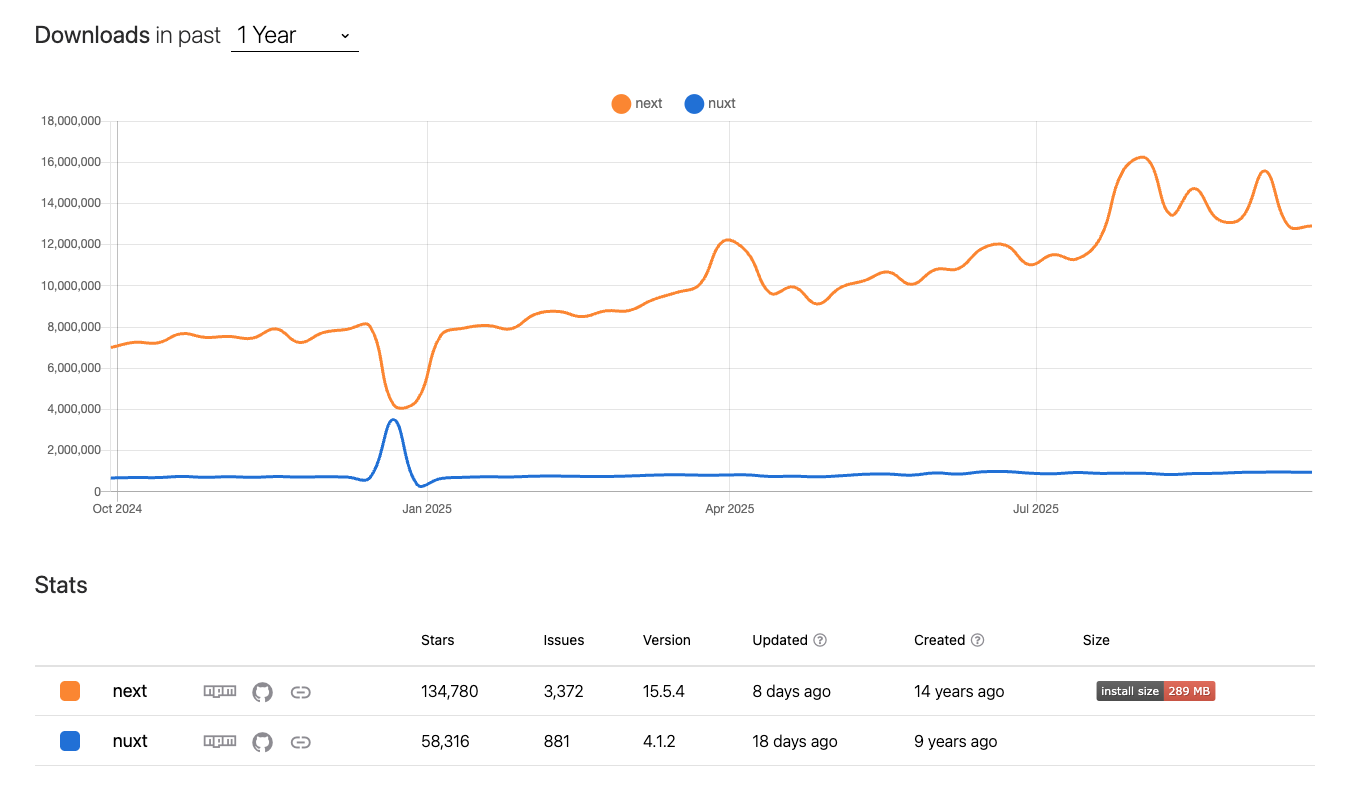
We can clearly see that Next is much more popular than Nuxt both in terms of GitHub stars and the number of downloads. The peak of downloads for Nuxt in December 2024 can be correlated with the release of Nuxt 3.15 that brings support for Vite 6 which was a long awaited feature.
One of the biggest philosophical differences remains ecosystem design.
Nuxt: Batteries-Included Productivity
- Modules: Official and community modules for
content,ui,devtools,image, etc., are often plug-and-play and follow strong conventions. - Auto imports: Components, composables, and utilities are auto-imported.
- Nitro adapters: Abstract away deployment targets: deploy to Node, Cloudflare Workers, Vercel, Netlify, or a Docker container — often with zero code change.
Next.js: Ecosystem Scale and Flexibility
- React universe: Tens of thousands of compatible libraries (UI kits, state management, data clients, testing tools, etc.).
- Built-in primitives: Image optimization, middleware, API routes, edge functions, and incremental regeneration are first-class.
- Freedom of choice: Less convention, more control.
Common features between Nuxt and Next.js
There are multiple features that both Next.js and Nuxt have that are extremely useful.
Incremental Static Regeneration
ISR (Incremental Static Regeneration) is a rendering strategy introduced by Next.js that blends the best of static site generation (SSG) and server-side rendering (SSR).
In a traditional static site, pages are generated once at build time and never updated until the next deployment. ISR changes that by allowing you to regenerate static pages on demand — without rebuilding the whole site.
The code below, showcases how you may use ISR in Next.js:
// app/posts/page.js
export const revalidate = 60;

export default async function Posts() {
  const res = await fetch("https://api.example.com/posts");
  const posts = await res.json();
  return posts.map((p) => <article key={p.id}>{p.title}</article>);
}
And here is the equivalent of Nuxt:
// nuxt.config.ts
export default defineNuxtConfig({
  routeRules: {
    "/posts/**": { swr: true, "s-maxage": 60 },
  },
});
Server Components
Until recently, Server Components were a React-only feature. That changed: Nuxt introduced experimental Server Components too.
The code below shows how to build a server component in Next.js:
// app/server/page.jsx
export default async function ServerOnly() {
  const data = await fetch("https://api.example.com/slow", {
    next: { revalidate: 10 },
  });
  const json = await data.json();
  return <div>{json.headline}</div>;
}
And the Nuxt equivalent:
// components/my-component.server.vue

<script setup>
  const { data } = await useFetch('/api/slow')
</script>

<template>
  <div>{{ data.headline }}</div>
</template>
Both frameworks now support "zero-client-JS" server components — making server-driven UI patterns easier than ever.
Hybrid Rendering and Route Rules
Hybrid rendering is a modern approach that lets you mix and match different rendering strategies — SSG, SSR, ISR, and client-side rendering (CSR) — within the same application.
Instead of committing to a single rendering model for your whole site, you decide per route or even per component how and when content is generated.
In Nuxt, we can achieve hybrid rendering in nuxt.config.ts like so:
// nuxt.config.ts
export default defineNuxtConfig({
  routeRules: {
    "/": { prerender: true },
    "/blog/**": { swr: true, "s-maxage": 600 },
    "/dashboard/**": { ssr: true },
  },
});
While in Next.js, it can be implemented like following:
export const dynamic = "force-dynamic";
export const revalidate = 300;

export default async function Dashboard() {
  // SSR with cache revalidation every 5 min
}
Unique Features of each framework
Let’s look at what sets these frameworks apart.
Auto Imports (Nuxt-Only)
Nuxt comes with the auto import feature that imports certain files such as components, composables, and utils in a smart way, resulting in fewer lines of code needed to achieve the same result.
Let’s take a look at the following example. We have created a new composable called useCounter:
// composables/useCounter.ts
export function useCounter() {
  const count = ref(0);
  return { count, inc: () => count.value++ };
}
Now, we can use it in the component easily without a need to import this file:
<script setup>
  const { count, inc } = useCounter();
</script>

<template>
  <button @click="inc">Clicked {{ count }} times</button>
</template>
This isn’t just syntactic sugar — under the hood, Nuxt uses a build-time scan and transform step that statically analyzes your code, rewrites import statements, and ensures tree-shaking still works. The result is cleaner components, less boilerplate, and virtually no runtime cost — all while preserving optimal bundle size.
Deployment Agnosticism (Nuxt-Only)
At first glance, JavaScript is "write once, run anywhere." So why can’t the same Nuxt or Next.js app just run on Vercel, Cloudflare Workers, or AWS Lambda without changes?
The answer is that each of those environments has different runtime constraints:
- Node.js servers have access to native modules, file systems, and synchronous APIs.
- Edge runtimes like Cloudflare Workers run in a V8 isolate with strict timeouts, no filesystem, and only Web-standard APIs like
fetch. - Serverless platforms often require packaging your app into specific formats (e.g., one handler per function) or splitting logic into multiple entry points.
This is where Nuxt’s Nitro runtime comes in. Nitro isn’t just a server — it’s a build step that compiles your server code into a portable output, adapting it to the constraints of each platform. It automatically generates the correct entrypoints, polyfills Node-specific APIs, and packages everything so the same Nuxt app can run seamlessly on:
- Traditional Node.js servers
- Serverless platforms like AWS Lambda or Vercel Functions
- Edge environments like Cloudflare Workers or Deno Deploy
In other words, deployment agnosticism means you don’t have to think about these runtime differences.
Your app code stays the same — Nitro handles the adaptation during the build.
// nuxt.config.ts
export default defineNuxtConfig({
  nitro: { preset: "cloudflare" }, // or 'vercel', 'node-server', 'aws-lambda'
});
Same code, many environments — a powerful feature for teams aiming for multi-cloud or multi-edge strategies.
React Server Actions (Next-Only)
One of the most transformative new capabilities in Next.js are Server Actions, a feature built on top of React’s server components model.
Server Actions allow you to define backend logic inline inside your components — without separate API routes, without client-side fetch calls, and without writing boilerplate state management.
Here’s an example:
// app/page.tsx
"use server";

export async function addTodo(data: FormData) {
  await db.todos.insert({ text: data.get("text") });
}

export default function Page() {
  return (
    <form action={addTodo}>
      <input name="text" />
      <button type="submit">Add Todo</button>
    </form>
  );
}
What’s happening here is fundamentally different from traditional API requests:
- The
addTodofunction runs directly on the server — but it’s invoked by the form action automatically. - There’s no API endpoint to write, no
fetch()call, and no client-server plumbing. - Next.js handles serialization, request handling, and type safety behind the scenes.
This approach blurs the line between backend and frontend, making simple mutations feel like function calls instead of network operations. It’s tightly coupled with the React runtime model, which is why it doesn’t exist in Vue or Nuxt.
Turbopack & Rust-Powered Dev Infrastructure (Next-Only)
Another Next.js-exclusive feature is its next-generation bundler and dev server: Turbopack. Built by the Vercel team as a successor to Webpack, Turbopack is written in Rust and designed specifically for the scale and complexity of modern React apps.
Key advantages:
- Massive performance gains: cold starts and incremental builds are significantly faster than Webpack.
- Granular invalidation: only the parts of your app that change are rebuilt, even in large monorepos.
- Zero-config integration: deeply integrated with the Next.js build pipeline, including support for React Server Components and edge deployments.
While Nuxt uses Vite (which is excellent for most apps), Turbopack is designed to push build performance well beyond what general-purpose tools can achieve — especially in large, enterprise-scale applications.
Because Turbopack is developed and maintained by Vercel specifically for Next.js, it remains a Next-exclusive feature for the foreseeable future.
The Vercel–NuxtLabs Merger: What It Means
In July 2025, Vercel announced the acquisition of NuxtLabs, the team behind Nuxt and Nitro.
What’s staying the same:
- Nuxt remains MIT-licensed and open source.
- Nitro’s deployment flexibility continues.
- Existing leadership (Daniel Roe, Sébastien Chopin) remains at the helm.
What’s changing:
- More funding → faster development cadence.
- Tighter Vercel integration → smoother edge and serverless deploys.
- Previously paid features (like Nuxt Studio) may become open-sourced.
This move could accelerate Nuxt’s growth while blurring the gap with Next — though some in the community are watching closely to ensure Nuxt maintains its framework-agnostic deployment promise.
Nuxt or Next: which to choose when?
Choosing between Nuxt and Next is no longer like choosing between white and black, life or death - both tools will do the work! There are small differences in terms of features that may affect your decision listed below:
| Scenario | Best Choice |
| Rapid prototyping / DX focus | Nuxt – batteries-included, fewer decisions |
| Content-heavy static sites | Nuxt or Next – both strong (Nuxt + Content module is powerful) |
| Data-heavy SaaS dashboards | Next – richer data libraries, RSC, ISR |
| Multi-cloud / portable hosting | Nuxt – Nitro adapters make this trivial |
| Edge + streaming focus | Next – mature server components + edge API |
| React ecosystem dependence | Next – huge package availability |
| Vue ecosystem / team skillset | Nuxt – zero learning curve for Vue devs |
Before actually committing to one solution or another, make sure to do the following:
- Prototype first. Implement one key page in both frameworks and measure: SSR TTFB, FCP, TTI.
- Consider team skills. Vue devs thrive in Nuxt quickly; React devs hit the ground running with Next.
- Evaluate deployment needs. If edge flexibility or multi-cloud portability matters, Nuxt’s Nitro is a killer feature.
- Watch the ecosystem. Nuxt is accelerating post-acquisition; Next continues to evolve rapidly (e.g., Turbopack, Flight, etc.).
Summary
In 2025, Nuxt and Next.js are no longer mirror opposites — they’re converging.
- Nuxt brings developer velocity, deployment portability, and a Vue-native DX that’s hard to match.
- Next.js delivers ecosystem scale, granular performance tuning, and cutting-edge React capabilities like streaming and advanced server components.
With Nuxt’s recent introduction of Server Components and Vercel’s strategic investment, the race is tighter than ever. Your choice will depend less on superficial benchmarks and more on team skillset, architectural needs, and ecosystem fit.
If you’re building content-driven products or need multi-cloud SSR flexibility — choose Nuxt.
If your project demands extreme performance tuning, React ecosystem breadth, or deep Vercel integration — choose Next.js.
Either way, you’re building on the future of full-stack web.
Build fast modern web apps
DebugBear can help you keep track of your website performance and identify performance optimizations. Get alerted when there's a page speed regression and compare test results to see what change caused the issue.


Monitor Page Speed & Core Web Vitals
DebugBear monitoring includes:
- In-depth Page Speed Reports
- Automated Recommendations
- Real User Analytics Data