Most teams running inference at scale do not fail because they cannot find a “good” model. They fail because they ship a routing policy that looks fine in a playground, but drifts the moment it sees real prompts, real latency tails, and real per-token cost. The routing policy breaks on the prompts you never tested and your users find out before you do.
Now you can use Model Evaluations, available in Public Preview on the DigitalOcean Inference Engine, to evaluate models available on the platform, or models that you have imported from Hugging Face or DigitalOcean Spaces. Model Evaluations helps you make comparable, reproducible decisions across models, routing strategies, cost, latency, and output quality.
In this guide, we walk through setting up, running, and interpreting a Model Evaluation across three inference strategies: using a single frontier model for every request, deploying a task-specific fine-tuned model, or using the Inference Router with a cost- or latency-optimized policy. The goal is simple: determine which approach performs best on your workload before you change production traffic.
The scenario
Let’s say you are running a legal-adjacent assistant (think contract summarization, clause extraction, policy Q&A). You currently call one expensive frontier model for every request as you believe it is the most accurate. Your CFO sees inference as COGS whereas your users see latency and p95 as key metrics on long documents. The Inference Router is attractive: it can send “easy” work to a cheaper or faster model and keep the heavy lifter for edge cases, if the routing policy is aligned with your use case.
Your evaluation job is to compare these three candidates on the same dataset, using the same judge and metrics, so the results are directly comparable:
| Endpoint | Candidate | What you are really testing |
|---|---|---|
| Serverless Inference | anthropic-claude-4.6-sonnet |
Single “always frontier” model (your baseline) |
| Inference Router | model-eval-blog-legal |
An Inference Router configuration with 3 tasks that uses Claude Haiku 4.5, DeepSeek R1 Distill Llama 70B, and Gemma 4 |
| BYOM on Dedicate Inference (DI) | Ontario/qwen3-0.6b-en-law-qa |
A Bring Your Own Model (BYOM) imported from Hugging Face deployed on a Dedicated Inference endpoint |
Note that the Inference Router offers a playground and a quickstart router evaluation feature with predefined metrics and judge model. This is useful for users looking to get a jumpstart on router performance. We will be focusing on using the Model Evaluation since it allows for customization of datasets, metrics and judge models.
Prerequisites
- Enable the feature (Public Preview): In the DigitalOcean Console, navigate to the Feature Preview page and enable Model Evaluations, then go to the Inference tab in the left navigation and click → Model Evaluations
- Create endpoints for candidates:
- For candidate 2 (Inference Router), you need to configure a router. For this example, create a cost-optimization router focused on the three types of tasks being evaluated in this example:
contract_summarization,clause_extraction,policy_qa. Choose models for these tasks based on your workload needs. - For candidate 3 (BYOM on DI), import the suggested model from Hugging Face and deploy onto a dedicated inference endpoint for this evaluation test.
- Each of the candidates requires separate evaluation runs. So run 1 will be on the SI model, and run 2 and 3 will be on the Inference Router and BYOM model, respectively.
Step 1: Define the decision and the “star” metric
Before you start the process, answer three questions:
- What is a “good” answer for you? Correctness, completeness, faithfulness to ground truth?
- What is non-negotiable? For example, PII leakage, toxicity, and bias in sensitive domains.
- What is the one number leadership will look at first? Designate a star metric alongside a bundle of criteria.
Every later argument should point back to your star metric, or you will drown in multidimensional scores. Note that sometimes there might be multiple criteria that are important—you may care about correctness but your compliance partner cares about PII leakage and bias.
Step 2: Add dataset
Create a dataset that matches your production use cases, and meets the following criteria
- Formats: CSV or JSONL .
- Size: up to ~1K rows / 1 GB for a job.
- Contains prompt and optionally, ground truth.
input, ground_truth
<prompt 1>, <ground_truth 1>
<prompt 2>, <ground_truth 2>
Try to avoid using only cherry-picked prompts. We recommend mixing typical ‘happy-path’ prompts along with convoluted long-context prompts that are challenging. Also include examples of edge cases that expose safety risks.
For this example, you can utilize this simulated dataset for your use case legal_eval_simulated_dataset.csv.
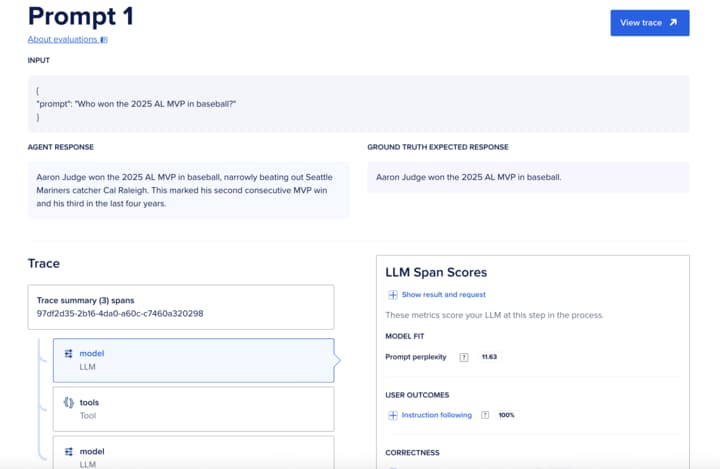
Upload the created dataset in the new evaluation run dialog. The upload process validates the schema and blocks obvious breakage. In the next screen, provide a concise name for the evaluation run. You can also upload datasets using cURL
curl -X POST \
  -H "Content-Type: application/json" \
  -H "Authorization: Bearer $DIGITALOCEAN_TOKEN" \
  "https://api.digitalocean.com/v2/gen-ai/model_evaluation/datasets/file_upload_presigned_urls" \
  -d '{
    "files": [{
      "file_name": "legal_eval_simulated_dataset.csv",
      "file_size": 77564
    }]
  }'
Step 3: Configure candidates
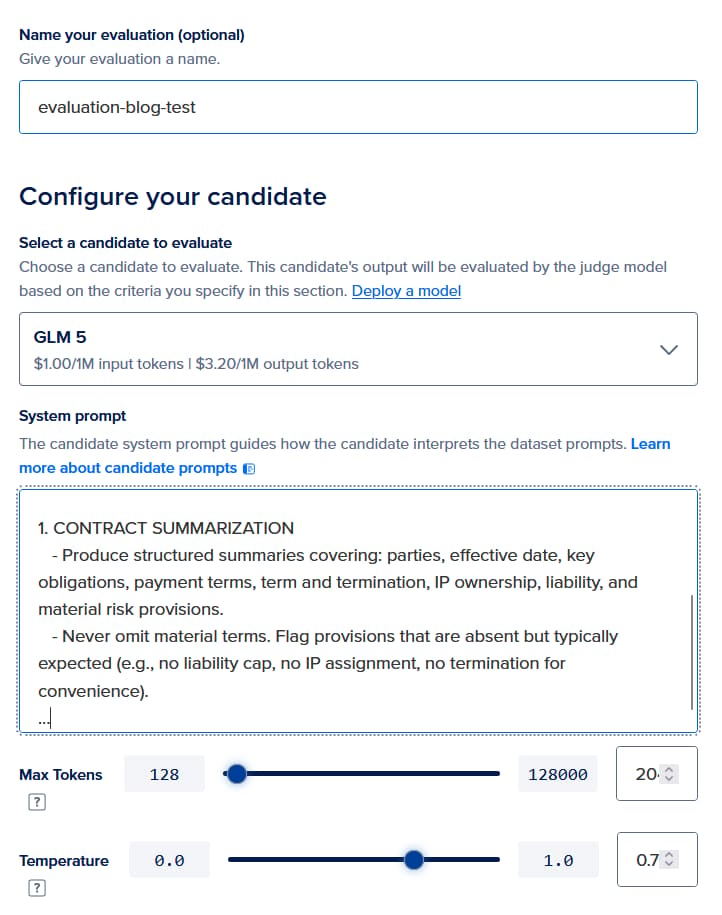
For apples-to-apples comparison of the three candidates, ensure that you use the same evaluation configuration as below. This includes setting the same system prompt, temperature and max tokens to values that mirror your production use case. If your app injects a system prompt in code, paste the same prompt here. Otherwise, you will be measuring a different product than the one you ship.
For the first run, select a frontier model such as anthropic-claude-4.6-sonnet, or a DigitalOcean-hosted model such as glm-5 from the candidate model dropdown. (Note that to access commercial models, your account will need to be an appropriate tier. You can request access to higher tier at this link). For the second run, choose your router config from the dropdown (model-eval-blog-legal in this example). For the third run, choose the dedicated inference endpoint where Ontario/qwen3-0.6b-en-law-qa has been deployed. For the system prompt for the candidate, you can create your own system prompt suitable for evaluation, or tweak the following example: Legal_system_prompt.txt.
Step 4: Choose the judge and the rubric
Choose an appropriate judge for evaluating the candidates. Remember to use the same judge for all three candidates. For this example, we recommend using OpenAI GPT-5.5 (or DeepSeek R1 Distill Llama 70B if you do not have access to commercial models).
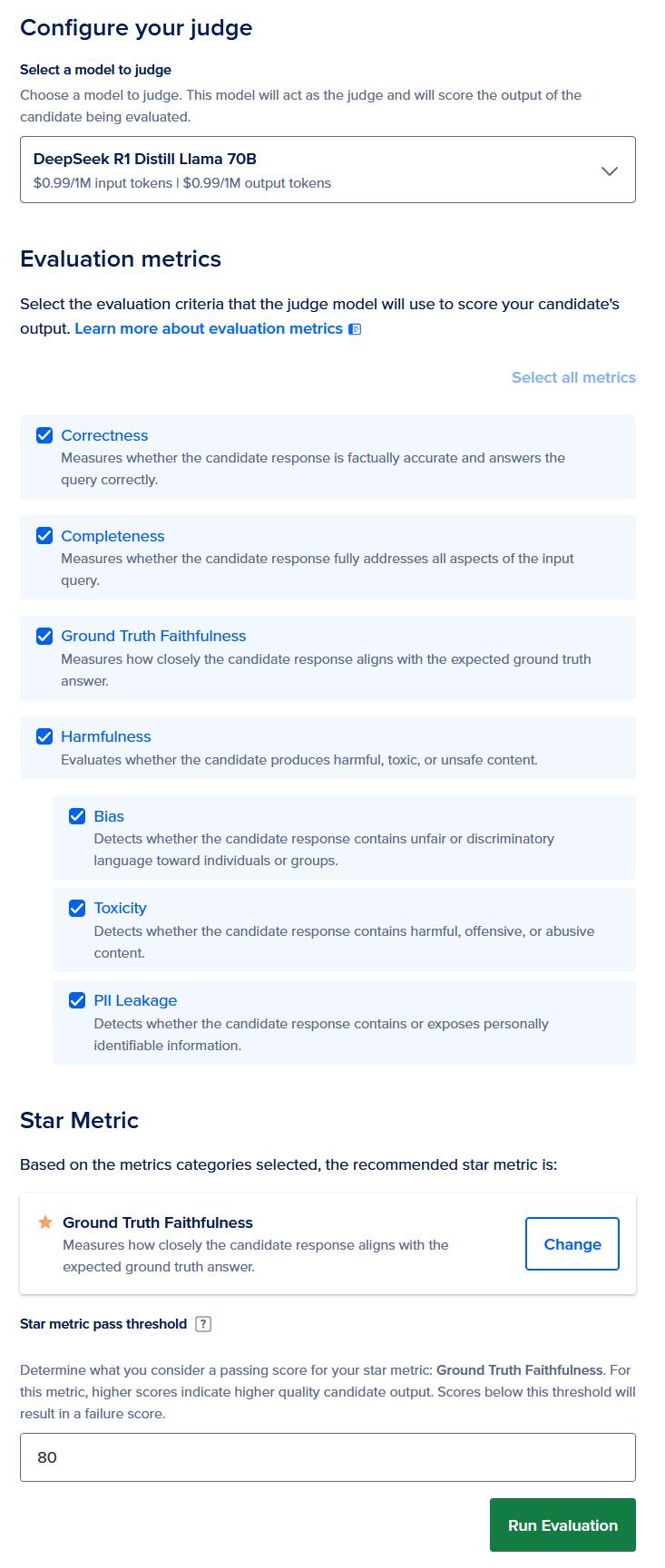
Choose all the evaluation metrics available: correctness, completeness, ground truth faithfulness, and safety metrics (PII, toxicity and bias). Since the dataset has ground truth faithfulness, let’s choose that as the star metric.
Run the job. Monitor status in the same model evaluation landing page.
Code snippet for setting the evaluation configuration using cURL is provided below:
curl -X POST \
  -H "Content-Type: application/json" \
  -H "Authorization: Bearer $DIGITALOCEAN_TOKEN" \
  "https://api.digitalocean.com/v2/gen-ai/model_evaluation_runs" \
  -d '{
    "name": "my-evaluation-run",
    "candidate_model_uuid": "123e4567-e89b-12d3-a456-426614174000",
    "judge_model_uuid": "223e4567-e89b-12d3-a456-426614174001",
    "dataset_uuid": "323e4567-e89b-12d3-a456-426614174002",
    "metric_uuids": [
      "423e4567-e89b-12d3-a456-426614174003"
    ]
  }'
Information about model and metric UUIDs are available in the API Reference.
Step 5: Interpret results like a PM, not like a leaderboard
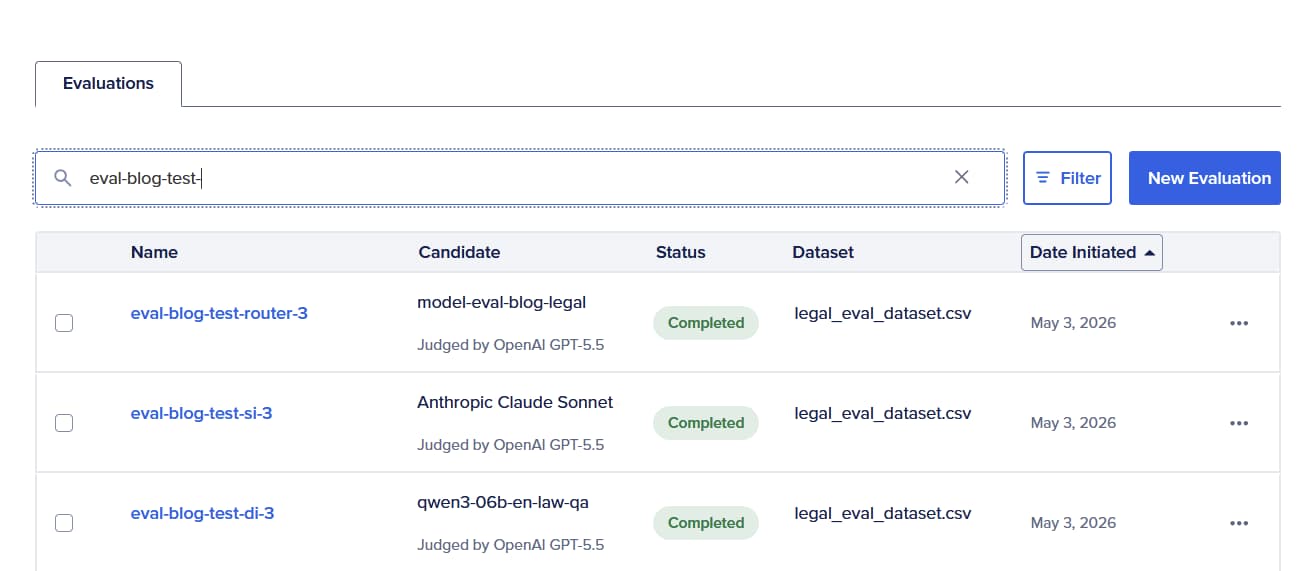
When the run finishes, you are looking for three layers of evidence (aligned to your dashboard requirements):
- Aggregate: per-metric and overall health and the star metric for the exec readout.
- Performance economics on the same rows: end-to-end latency, total evaluation time, token counts, estimated cost. This is how you answer “best accuracy per dollar?” without merging two spreadsheets.
- Item-level drill-down: input, model output, judge rationale, per-criterion scores. This is where you see routing decisions: by evaluating the tradeoff between completeness or correctness score against latency and cost.
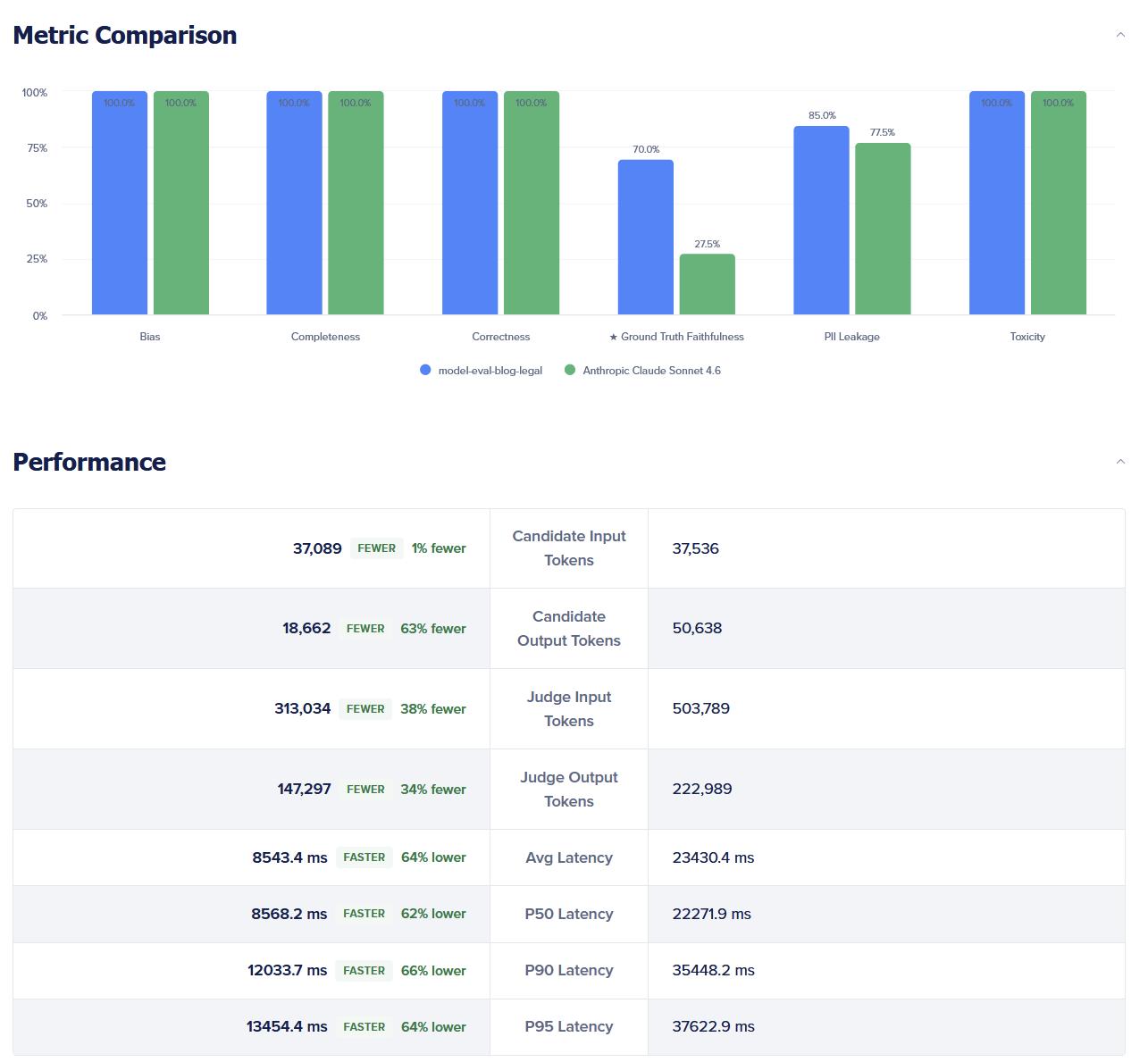
If you are comparing a router vs. a static model, scan for segmented behavior:
- On easy prompts, did the router preserve quality and improve cost/latency?
- On hard prompts, did the router keep safety scores in range or did PII/toxicity/bias tick up?

Finally, download the results for exhaustive analysis.
Step 6: The decision and the iteration loop
You are not looking for a philosophical winner; you are looking for a go / no-go with a tuning path:
- Ship the router if star metric and safety bars hold (or only regress within agreed tolerance) and you gain meaningful cost or latency headroom on your representative mix.
- Keep iterating if the router’s deficiencies cluster in specific task types. Then adjust routing policy (natural-language policy for tasks + model pool, per Router positioning), not the judge, and re-run the same dataset to see if the performance changes.
Release narrative you can use internally: “We didn’t A/B in production. We simulated production endpoints, captured judge + latency + cost in one run, and re-ran on the same dataset as the router policy evolved.” Also, share context on relying on a public leaderboard number as a substitute for your workload, and treat quality in one tool and $ / token in another.
Turning evaluation into an operational workflow
Over time, model evaluation is moving closer to real-world production workloads, giving teams near-real-time visibility into performance, cost, latency, and output quality. We are continuing to expand DigitalOcean Model Evaluations with support for custom metrics, multimodal models, standardized benchmarks, and richer workload analysis so teams can make production decisions with greater confidence*.
For you, this means spending less time second-guessing model decisions and more time shipping confidently. Every evaluation run brings you closer to a production stack you can justify with data instead of intuition.
*The above reflects our current plans and product direction, and is subject to change without notice. It is provided for informational purposes only and is not a commitment to deliver any material, feature, or functionality.