A/B testing allows us to select the best-performing design version from two distinct design versions, usually by modifying only a single design element. It’s a very effective technique for evaluating one major design element change against the original version, but what if you have to test multiple design element changes?

Multivariate testing helps us evaluate more than two design versions with multiple design element changes at once and identify the best-performing design element combination. Let’s understand what multivariate testing is, compare it with A/B testing, and when you should prefer using it over A/B testing.
What is multivariate testing?
In UI/UX design, multivariate testing (MVT) is a UX design experimentation method that evaluates multiple design versions (more than two) by using combinations of multiple interdependent design elements. It focuses on selecting the best-performing design element setup by evaluating all possible configurations:
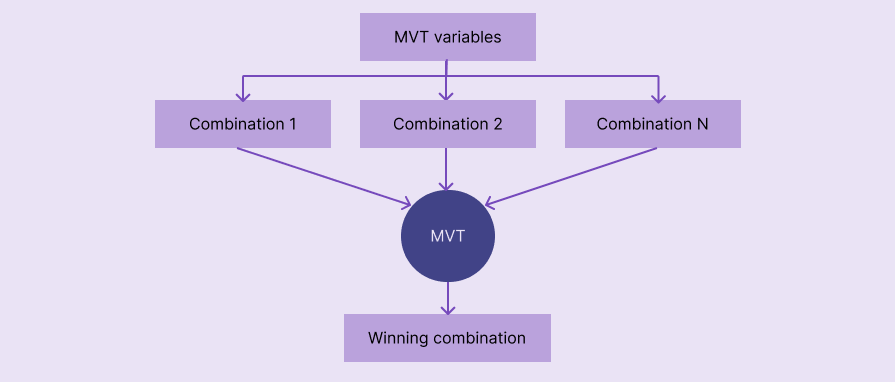
Here are some examples of MVT:
- Finding the best-performing hero section design by doing an MVT for 2 headline variants, 3 CTA variants, and 2 background imagery variants. This MVT runs 12 total hero sections (2 x 3 x 2 = 12)
- Identifying the best-performing ecommerce product item card design using an MVT for 2 price label positionings, 2 thumbnail image styles, and 2 CTA button colors. This MVT runs 8 total item card combinations (2 x 2 x 2 = 8)
Steps in multivariate testing
In an MVT, you’ll have to go through the following steps, from defining the test goals to analysis:
- Defining the goals and metrics: First, understand why you should use MVT for the specific design region. Answer the question “Why should I do an MVT?” and clearly define why an MVT should be done. Then, define metrics to measure success, e.g., doing an MVT to increase the conversion rate of the hero section. You’ll also have to define a statistical hypothesis if you are doing a p-value-based analysis
- Selecting variables: Unlike A/B testing, MVT involves multiple design elements. Select variables, usually design elements, that produce multiple design combinations, e.g., CTA button, hero section heading, item thumbnail, etc.
- Creating variants: Create designs for all possible design combinations based on variables. For example, if your MVT’s variables are CTA and heading, and each has 2 variants, you’ll have to create 4 designs
- Experimentation: Run the MVT using either the 50/50% traffic split or the multi-armed bandits method under p-value or Bayesian evaluation foundation. You’ll generally redirect traffic to all combinations to identify what performs best
- Analysis and deployment: Prove which design version will likely perform best using the p-value statistical method or the Bayesian probabilistic method, then send it for deployment
Note that you don’t need to perform these steps manually since popular UX testing tools like Optimizely and VWO automate MVT.
Benefits of multivariate testing
Using MVT comes with the following benefits compared to A/B testing:
- Testing multiple design elements: You aren’t limited to testing only one design element at a time — select any number of multiple design elements at once for experimentation
- Testing combinations: MVT creates multiple design combinations based on variables and helps identify the best element combination
- Deeper UX understanding: MVT design variables are usually interdependent elements, so you can form your own design principles by researching the relationship among the design elements of the winning combination
Challenges of multivariate testing
MVT effectively selects the best-performing combination, but you’ll have to face the following challenges:
- Requires higher traffic: Requires more traffic than you usually need to conduct A/B testing, since MVT tests more versions like A/B/n testing
- Complexity: More design variables and variants lead to many design combinations and can complicate the whole test
- Requires automation: A/B tests can be done without any testing tools with fair productivity, but running MVT manually is extremely time-consuming, especially if you need to test many combinations
A/B testing vs. multivariate testing
Let’s compare A/B testing with MVT to understand when to prefer each in UX testing scenarios:
| COMPARISON FACTOR | A/B TESTING | MULTIVARIATE TESTING |
| Description | Evaluates two (or more with A/B/n) different design versions | Evaluating multiple design element combinations to find the best-performing one |
| Test complexity | Simple | Complexity grows with the number of combinations |
| Traffic requirement | Medium | Higher |
| Analysis methods | p-value and Bayesian | p-value and Bayesian |
| Speed | Faster since there are only two versions | Slower since all combinations should get enough traffic |
| When to use | Testing a major change that involves one design element | Identifying the best-performing design combination by changing multiple design elements |
| Automation requirements | Optional, can be done manually | Mandatory, manual MVT is time-consuming |
MVT is the best technique for UX testing scenarios, where you should identify the best-performing element combination. A/B testing is best for testing one major design change with only two design versions.
Conclusion
MVT is an extended version of the A/B/n test for identifying the best-performing design element combinations. It’s so beneficial to test multiple, interdependent design elements and study deeper UX insights that you can use to form your own design principles for your product. e., a motivational heading + a green color CTA performs well for a sustainable energy product landing page
FAQs
How to use multivariate testing with low-traffic products?
MVT with low traffic isn’t generally recommended, but you can get better results by using multi-armed bandits and Bayesian evaluation
Is multivariate testing better than A/B testing?
Neither is universally better — A/B works best with simple decision making under one major change, and MVT works best for evaluating combinations
The post A/B testing vs. multivariate testing: When to use each UX testing method appeared first on LogRocket Blog.