Earlier today, we launched a Preview of Actions in Edge, an experimental, opt-in agentic browser feature, available for testing and research purposes. Actions in Edge uses modern CUA (Computer-Using Agent) models to complete tasks for users in their browsers. We are excited about the many exciting and emergent possibilities this feature brings, but as a new technology, it introduces new potential attack vectors that we and the rest of the industry are taking on.
We take very seriously our responsibility to keep our users safe on the web. This space is so new and uncharted that we cannot do that in isolation. Our goal with this preview is to explore these new waters with a small set of engaged users and researchers who have a clear understanding of the possibilities and the potential risks of agentic browsers. We have built a number of mitigations and are working closely with the AI and security research community to develop and test new approaches which we will be testing with our active community over the next few months. We welcome all input and feedback and will be actively engaged on our Discord channel here.
Users of Actions in Edge feature should carefully review the risks and warnings in Edge before enabling the feature and be vigilant when browsing the web with it enabled.
“Ignore All Previous Instructions”: Prompt injection attacks
AI chatbots have been dealing with prompt injection attacks since their inception, with early attacks being more annoying than outright dangerous. But as AI Assistants have become more capable of doing things (with connectors, code generation, etc.), the risks have risen. Agentic browsers, by virtue of the additional power they bring and their access to the breadth of the open web, add more opportunities for attackers to take advantage of gaps and holes.This is not a theoretical concern: Researchers, including our own security teams, have already published proof-of-concept exploits that use prompt injection to take control of early agentic browsers. These concepts demonstrate that, without protections, attackers can easily craft content that steals users’ data or performs unintended transactions on their behalf.
Our approach to Prompt Injection attacks
The key to any protection strategy is defense-in-depth:- Untrusted input: We start by assuming that any input from an untrusted source may contain unsafe instructions.
- Detect deviations: Prompt injections generally cause the model to do something different from what the user asked of it. Mitigations can be created to detect and block those deviations.
- Limit access to sensitive data or dangerous actions: Simply put, if the model can’t get to something or do something bad, then the risks are lower.
Protecting from untrusted Input
This phase includes the most basic protection: limit where Copilot gets data from. In this preview we have implemented the following top-level site blocks to avoid known or risky sites.- Scoped to known sites by default – In the default “Balanced Mode” setting, Actions in Edge only allow access to a curated list of sites. Users can allow Actions to interact with other sites by approving them. Users can also configure “Strict Mode” in settings which overrides the curated allow list and gives them full control to approve every site Actions interacts with.
- SmartScreen protection – Microsoft Defender SmartScreen detects and protects millions of Edge users every day from sites confirmed as scams, phishing, or malware. While Copilot is controlling the browser, suspicious or bad sites are blocked automatically by SmartScreen, and the agent is prevented from bypassing the block page.
- Azure Prompt Shields mitigate attacks by analyzing whether data is malicious.
- Built-in safety stack – Copilot is trained specifically to detect and report safety violations if malicious content tries to encourage violence or harmful behavior.
- Spotlighting (in testing) – Kiciman, et al, of Microsoft Research, described a technique called Spotlighting to better separate user instructions from grounding content (documents and web pages) so the model can better ignore injected commands without impacting efficacy. We will be testing Spotlighting with Actions in Edge and will report on its effectiveness.
- Real-time SmartScreen blocks – when new sites are confirmed as scams, phishing, or malware, the SmartScreen service can block them for all Edge users worldwide within minutes.
- Global blocklist updates within hours – When new sites are identified as unsafe for Copilot to read, we can update the global blocklist within hours.
Detecting and blocking deviations from the task
Modern AI models, by design, take somewhat unpredictable paths to accomplish the tasks they are set. This can make it challenging to determine whether or not the model is doing what it was asked to do.In Actions for Edge, we add checks to detect hidden instructions, task drift, and suspicious context and to ask for confirmation when risk is higher. Examples include:
[caption id="attachment_26077" align="aligncenter" width="422"]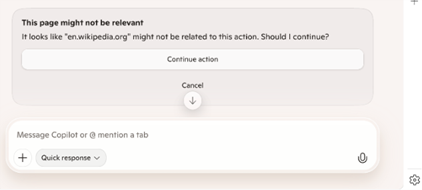 Relevance checks confirm with the user when a site seems unrelated to the original task[/caption]
- Relevance checks, shown above, give the user a chance to stop an action if a secondary model detects possible task drift.
- High risk site prompts – when a context is detected to be sensitive (e.g. email, banking, health, sensitive topics) the model will stop and request permission to continue.
- Task Tracker (in testing) - Paverd et al described a novel technique known as Task Tracker, which monitors activation deltas to detect when the model drifts from the user’s original intent after processing external data. We are integrating these techniques into our orchestration layer, validating their precision, and reducing false positives with the MAI Security team. We will report on progress here as well.
Limit access to sensitive data or dangerous actions
Finally, to mitigate the impact of any bypasses, when the model is running, the browser limits its access to sensitive data or dangerous actions. In this preview, we have disabled the ability for the model to use form fill data, including passwords.Other restrictions include (but are not limited to):
- No interaction with edge:// pages (e.g., Settings) or UI outside a tab’s web content.
- External app launches are blocked (protocol handlers).
- Downloads are disabled.
- No ability to open the file or directory selection dialog.
- No access to data or apps outside of Edge
- Context menus are disabled.
- Tab audio is muted by default.
- Site Permission changes are blocked (For example, if a site requests camera access permissions, the agent cannot grant that permission).