The WCAG 2.2 AA Checklist for Website Owners
Read the original on levelaccess.com ↗This Web Content Accessibility Guidelines (WCAG) 2.2 AA checklist covers 55 success criteria: 31 at Level A and 24 at Level AA. It includes six criteria added in 2023 and drops 4.1.1 Parsing, which the World Wide Web Consortium (W3C) removed as obsolete. WCAG groups criteria under the four POUR principles: perceivable, operable, understandable, and robust.
WCAG 2.2 has been the W3C’s Official Recommendation since October 5, 2023, and some regulations are already moving toward this standard. In September 2026, European standards bodies published the latest version of EN 301 549, incorporating WCAG 2.2 AA for web and mobile content. Once cited by the Official Journal of the European Union (EU), this will become the compliance benchmark for both the European Accessibility Act (EAA) and the Web Accessibility Directive (WAD).
Meanwhile, in the U.K., authorities already monitor public-sector websites and apps against WCAG 2.2 AA. Even though most U.S. rules still reference WCAG 2.1 AA, many organizations build toward 2.2 AA to future-proof compliance and meet a wider range of user needs.
If you’re targeting WCAG 2.2 conformance and unsure where to start, a checklist can help break down the work. The challenge? Finding a reliable checklist isn’t easy. Sources disagree on how many criteria a WCAG 2.2 AA checklist includes: The Level A count varies because some references still include a retired success criterion, 4.1.1 Parsing. Many checklists also cover only the nine new criteria in WCAG 2.2.
Here, you’ll find the complete list of all 55 Level A and AA criteria, sourced to the W3C. We’ll cover every Level A and AA criterion by principle, what changed from WCAG 2.1, and where the standard is referenced in laws. You’ll also learn how to start testing your site against WCAG 2.2 with a downloadable interactive checklist.
Key insights
- WCAG 2.2 AA conformance means meeting 55 success criteria: 31 at Level A and 24 at Level AA.
- Compared to WCAG 2.1, WCAG 2.2 added nine criteria, six of them at Level A or AA, and removed 4.1.1 Parsing as obsolete.
- The criteria fall under the four POUR principles: Perceivable (20 criteria), Operable (20), Understandable (13), and Robust (2). The six new criteria fall in Operable and Understandable.
- Different regional laws reference different WCAG versions. EU regulations are moving to WCAG 2.2 AA, and the U.K. monitors public-sector websites against it. In the U.S., rulemaking under Title II of the Americans with Disabilities Act (ADA) names WCAG 2.1 AA, and the Section 508 standard incorporates WCAG 2.0 AA.
- A checklist is a starting point on your path to meeting WCAG 2.2, but conformance takes more than quick fixes. It involves automated testing, manual evaluation with assistive technologies, ongoing monitoring, and proactively building accessibility into design, development, and content creation workflows.
What is WCAG 2.2 AA?
WCAG is a technical standard published by W3C. WCAG 2.2 became a W3C Recommendation on October 5, 2023, and the current edition is dated December 12, 2024.
The standard rests on four principles known as POUR: perceivable, operable, understandable, and robust. Together, they call for content that users can access through different senses and input methods, navigate, understand, and use with assistive technology. Each testable requirement is a success criterion, and each criterion carries a conformance level: A, AA, or AAA.
Level AA is the usual target, because most laws and policies that reference WCAG name it. To conform at Level AA, content has to meet every Level A and Level AA criterion. WCAG 2.2 has 86 success criteria in total: 31 at Level A, 24 at Level AA, and 31 at Level AAA. A WCAG 2.2 AA checklist covers the 55 at Levels A and AA.
What’s new in WCAG 2.2?
WCAG 2.2 added nine success criteria to WCAG 2.1 and removes one, 4.1.1 Parsing. That takes the total from 78 criteria in WCAG 2.1 to 86 in WCAG 2.2. The new criteria focus on meeting the access needs of people with low vision, cognitive and learning disabilities, and motor disabilities, including people who use touch screens.
Six of the nine are at Level A or AA, so they belong on your WCAG 2.2 AA checklist. The other three are Level AAA. They’re included here for reference and aren’t part of an AA checklist.
Most of the new criteria are easiest to address during design, before development begins.
Success criteria added in WCAG 2.2
| No. | Name | Level | Who it helps | What to check |
|---|---|---|---|---|
| 2.4.11 | Focus Not Obscured (Minimum) | AA | People who navigate by keyboard or keyboard-like devices, and people with low vision | When a component receives keyboard focus, other content doesn’t completely cover it. |
| 2.4.12 | Focus Not Obscured (Enhanced) | AAA | Same group as 2.4.11 | No part of the focused component is covered by other content. |
| 2.4.13 | Focus Appearance | AAA | People with low vision and people with cognitive or learning disabilities | The keyboard focus indicator has enough size and contrast against the unfocused state. |
| 2.5.7 | Dragging Movements | AA | People with limited dexterity, and people who use a head pointer, eye tracking, or voice control | Any function that uses dragging also works with a single pointer without dragging, such as tapping or clicking. |
| 2.5.8 | Target Size (Minimum) | AA | People with tremors or limited dexterity, and anyone who uses a touch screen | Interactive targets measure at least 24 by 24 CSS pixels, or have enough spacing, with limited exceptions. |
| 3.2.6 | Consistent Help | A | People with cognitive or learning disabilities, and people who use screen magnification | Help options, such as contact details or a chat link, sit in the same relative place on every page that offers them. |
| 3.3.7 | Redundant Entry | A | People with cognitive or learning disabilities, people with limited mobility, and people who use screen readers | Information users already entered in a process is filled in for them or available to select, with exceptions such as security. |
| 3.3.8 | Accessible Authentication (Minimum) | AA | People with memory-related or learning disabilities | Logging in doesn’t require a cognitive function test, such as remembering or transcribing a password, unless an alternative or help is offered. Object recognition and user-provided content tests are allowed at this level. |
| 3.3.9 | Accessible Authentication (Enhanced) | AAA | Same group as 3.3.8 | Same as 3.3.8, without the exceptions for object recognition and user-provided content. |
Why 4.1.1 Parsing was removed
4.1.1 Parsing was a Level A criterion in WCAG 2.0 and 2.1. It required markup to follow basic rules, such as complete start and end tags and unique IDs. The W3C removed it from WCAG 2.2 because browsers and assistive technologies now handle most of these markup errors consistently. Other criteria, such as 4.1.2 Name, Role, Value, still cover markup issues that affect users.
The removal explains why some online checklists disagree. Sources that still count 4.1.1 report 32 Level A criteria, while WCAG 2.2 has 31. For more perspective on why Parsing was removed, read this article on 4.1.1 from our Chief Accessibility Officer, Jon Avila.
WCAG 2.2 AA checklist
The following tables cover all 55 Level A and AA success criteria in WCAG 2.2, grouped by the four POUR principles. Each table lists the criterion number, its official name, its level, and what to check for conformance. The last column flags criteria that are new in WCAG 2.2.
For a complete, interactive checklist covering all WCAG 2.2 A, AA, and AAA criteria, download our Must-Have WCAG Checklist. This ready-to-share guide also breaks down each individual success criterion in plain language.
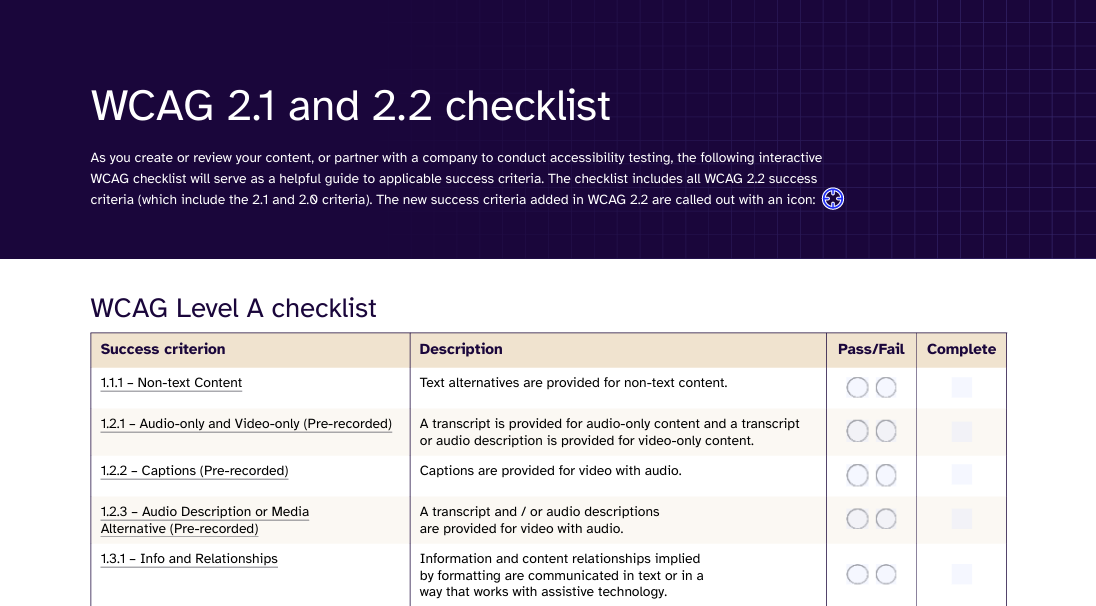
Get our downloadable WCAG checklist to complete for your organization.
Perceivable
Perceivable criteria make sure users can access information through more than one sense or method. This principle has 20 criteria: nine at Level A and 11 at Level AA.
| No. | Name | Level | What to check | New in 2.2? |
|---|---|---|---|---|
| 1.1.1 | Non-text Content | A | Text alternatives are provided for non-text content | No |
| 1.2.1 | Audio-only and Video-only (Prerecorded) | A | A transcript is provided for audio-only content and a transcript or audio description is provided for video-only content. | No |
| 1.2.2 | Captions (Prerecorded) | A | Captions are provided for video with audio. | No |
| 1.2.3 | Audio Description or Media Alternative (Prerecorded) | A | A transcript and/or audio descriptions are provided for video with audio. | No |
| 1.2.4 | Captions (Live) | AA | Synchronized captions are provided for live videos containing audio. | No |
| 1.2.5 | Audio Description (Prerecorded) | AA | If there is important visual content in a video that is not presented in the accompanying audio, an audio description is provided. | No |
| 1.3.1 | Info and Relationships | A | Information and content relationships implied by formatting are communicated in text or in a way that works with assistive technology. | No |
| 1.3.2 | Meaningful Sequence | A | The reading order of content is meaningful, no matter how a user accesses or consumes it. | No |
| 1.3.3 | Sensory Characteristics | A | Instructions rely on more than one sense. | No |
| 1.3.4 | Orientation | AA | Screen orientation is not restricted unless the orientation is considered essential. | No |
| 1.3.5 | Identify Input Purpose | AA | For each form field collecting user information, the purpose of the field is programmatically declared. | No |
| 1.4.1 | Use of Color | A | Color is not the only way used to distinguish an element, convey meaning, indicate an action, or prompt a response. | No |
| 1.4.2 | Audio Control | A | A mechanism is provided to control audio that plays on page automatically for more than three seconds. | No |
| 1.4.3 | Contrast (Minimum) | AA | The contrast ratio between regular-sized, nondecorative text and its background is at least 4.5:1. | No |
| 1.4.4 | Resize Text | AA | Text can be resized up to 200% without loss of content or function. | No |
| 1.4.5 | Images of Text | AA | Aside from a few specific exceptions, there are no images of text. | No |
| 1.4.10 | Reflow | AA | Content presentation is responsive and doesn’t require scrolling in two dimensions. | No |
| 1.4.11 | Non-text Contrast | AA | The contrast ratio between non-text elements (including any states) and their background is at least 3:1. | No |
| 1.4.12 | Text Spacing | AA | Text spacing can be overridden to improve the reading experience. | No |
| 1.4.13 | Content on Hover or Focus | AA | When additional content is presented on hover or on focus, the new content is persistent and dismissable. | No |
Operable
Operable criteria make sure every function works with a keyboard, a pointer, or other input methods, and that users have enough time and clear ways to navigate. This principle has 20 criteria: 14 at Level A and six at Level AA. Three of the AA criteria are new in WCAG 2.2.
| No. | Name | Level | What to check | New in 2.2? |
|---|---|---|---|---|
| 2.1.1 | Keyboard | A | All functionality is operable using a keyboard (with exceptions). | No |
| 2.1.2 | No Keyboard Trap | A | The focus does not get trapped on any element in keyboard-only navigation. | No |
| 2.1.4 | Character Key Shortcuts | A | No single-key shortcuts are used, or a way to turn them off or change them is provided. | No |
| 2.2.1 | Timing Adjustable | A | If a page has a time limit, users can turn the time limit off, adjust it, or extend it. | No |
| 2.2.2 | Pause, Stop, Hide | A | User controls are provided for moving or dynamically changing content. | No |
| 2.3.1 | Three Flashes or Below Threshold | A | No content flashes more than three times per second, or the flash is below flash thresholds. | No |
| 2.4.1 | Bypass Blocks | A | When blocks of content are repeated on multiple pages, a mechanism is provided to bypass/skip them. | No |
| 2.4.2 | Page Titled | A | Page titles clearly describe the page topic or page purpose. | No |
| 2.4.3 | Focus Order | A | The tabbing order of the content is meaningful and supports operation | No |
| 2.4.4 | Link Purpose (In Context) | A | The purpose of each link can be determined from the link text alone or from the link text and its related context. | No |
| 2.4.5 | Multiple Ways | AA | There is more than one way to reach each page. | No |
| 2.4.6 | Headings and Labels | AA | Headings and labels are clear and descriptive | No |
| 2.4.7 | Focus Visible | AA | Keyboard focus is clear and visible. | No |
| 2.4.11 | Focus Not Obscured (Minimum) | AA | When an actionable element receives focus, at least a portion of it remains visible. | Yes |
| 2.5.1 | Pointer Gestures | A | A single pointer alternative to complex pointer or touch gestures is provided. | No |
| 2.5.2 | Pointer Cancellation | A | For functionality that is operated by a single pointer, a way to cancel the pointer input is provided. | No |
| 2.5.3 | Label in Name | A | The programmatic name contains the text that is presented visually. | No |
| 2.5.4 | Motion Actuation | A | For functions that are triggered by moving a device or by gesturing toward a device, an alternative way of triggering the response is provided. | No |
| 2.5.7 | Dragging Movements | AA | If any part of a website requires a dragging movement, an alternative means of dragging, such as tapping or clicking, is provided. | Yes |
| 2.5.8 | Target Size (Minimum) | AA | The size of a target is at least 24 by 24 CSS pixels (with exceptions). | Yes |
Understandable
Understandable criteria make content and interface behavior clear and predictable. This principle has 13 criteria: seven at Level A and six at Level AA. Three of them are new in WCAG 2.2.
| No. | Name | Level | What to check | New in 2.2? |
|---|---|---|---|---|
| 3.1.1 | Language of Page | A | Each page has a human language assigned. | No |
| 3.1.2 | Language of Parts | AA | Assistive technology can distinguish and reflect when the human language on a page changes. | No |
| 3.2.1 | On Focus | A | Interactive elements receiving focus do not trigger any functionality. | No |
| 3.2.2 | On Input | A | Interactive elements receiving input do not trigger any functionality. | No |
| 3.2.3 | Consistent Navigation | AA | Navigational elements are consistently displayed, including their location and the order of their content. | No |
| 3.2.4 | Consistent Identification | AA | Components with the same functionality are consistently identified. | No |
| 3.2.6 | Consistent Help | A | Help options provided are consistently available and in the same relative place throughout. | Yes |
| 3.3.1 | Error Identification | A | When input error is detected, the user is notified and the error is described. | No |
| 3.3.2 | Labels or Instructions | A | A persistent visible label and/or instructions are provided for elements that require user input. | No |
| 3.3.3 | Error Suggestion | AA | Users receive helpful/specific suggestions when they make errors. | No |
| 3.3.4 | Error Prevention (Legal, Financial, Data) | AA | Users receive helpful/specific suggestions when they make errors. | No |
| 3.3.7 | Redundant Entry | A | Information that the user has already entered during a process is made available to them. | Yes |
| 3.3.8 | Accessible Authentication (Minimum) | AA | When a cognitive function test is used to authenticate a user, an alternative way to authenticate, or a help mechanism to complete the authentication is provided. | Yes |
Robust
Robust criteria make sure content works reliably with browsers and assistive technologies. This principle has two criteria: one at Level A and one at Level AA.
| No. | Name | Level | What to check | New in 2.2? |
|---|---|---|---|---|
| 4.1.2 | Name, Role, Value | A | All user interface components communicate their accessibility properties and actions to assistive technology. | No |
| 4.1.3 | Status Messages | AA | Status messages can be presented to the user by assistive technology without receiving focus. | No |
Where WCAG 2.2 AA is referenced in laws and standards
WCAG is a standard, not a law, so WCAG conformance isn’t the same as legal compliance. Even so, WCAG is widely accepted as the benchmark for meeting the effective communication requirements of the ADA and other laws, which is why WCAG conformance is a recommended best practice for reducing the risk of a web accessibility lawsuit.
WCAG is also explicitly referenced by laws and regulations around the world. Which version applies depends on where you operate and who you serve, and most regulations still name an earlier version.
European Union
EN 301 549 is the harmonized European accessibility standard. It’s the presumptive standard of conformity for the WAD and the EAA, which has been in force since June 28, 2025.
EN 301 549 V4.1.1 was published on Sep 2, 2026, and it moves the web baseline to WCAG 2.2 AA. Until the Official Journal of the EU cites it, which is expected in late 2026, V3.2.1 remains the legal reference. V3.2.1 adopts WCAG 2.1 AA and adds some more requirements for products that are not directly covered by WCAG.
United States
ADA Title II applies to state and local governments, and a 2024 rule names WCAG 2.1 AA as the technical standard for web and mobile content. After an interim final rule published on April 20, 2026, compliance dates are April 26, 2027 for larger entities and April 26, 2028 for smaller ones.
While no regulation names a technical standard for private businesses under ADA Title III, WCAG 2.1 AA is the benchmark most often cited in demand letters, settlements, and consent decrees. Section 508 of the Rehabilitation Act, which covers U.S. federal agencies, incorporates WCAG 2.0 AA in its standards.
Even though many U.S. laws still reference earlier versions of WCAG, forward-thinking organizations are already building to WCAG 2.2. Content that conforms to WCAG 2.2 also conforms to WCAG 2.1, so WCAG 2.2 conformance lets organizations meet existing obligations while staying ahead of potential future regulatory updates and meeting the access needs of more users.
United Kingdom
The U.K. Government Digital Service (GDS) monitors public sector websites and apps against WCAG 2.2 AA, and has done so since October 2024.
Canada
In Ontario, the Accessibility for Ontarians with Disabilities Act (AODA) requires public websites and web content to conform to WCAG 2.0 AA, with exceptions for live captions and prerecorded audio description. It applies to designated public-sector organizations and to larger private and nonprofit organizations.
At the federal level, Canada’s official standard for accessible information and communications technology is CAN/ASC-EN 301 549:2024, its adoption of EN 301 549. For web content, it incorporates WCAG 2.1 AA success criteria.
Australia
While Australia’s Disability Discrimination Act doesn’t name a WCAG version, the Digital Experience Policy, which applies to the Australian Government, uses WCAG 2.2. The Australian Human Rights Commission’s 2025 guidelines also point organizations toward WCAG 2.2 AA.
India
In India, a 2025 Supreme Court ruling recognized digital access as a fundamental right. It directed that digital KYC services follow WCAG 2.1 and the government’s Guidelines for Indian Government Websites (GIGW).
How to test your site for WCAG 2.2 AA conformance
Reliable testing combines automated scans with manual evaluation using assistive technologies. Automated tools find many issues quickly, such as missing text alternatives or low contrast, but they don’t catch everything. For example, they can’t judge whether alternative text is meaningful or whether a keyboard path makes sense for a real user.
During a digital accessibility audit, an expert will evaluate important journeys, pages, and components, with the keyboard and assistive technologies. Paired with automated scan results, this evaluation gives you a complete picture of your conformance. A strong audit will also help you understand what to fix first.
Go beyond the checklist
WCAG 2.2 AA conformance isn’t a one-time exercise. A checklist is a helpful starting point, but meeting the standard — and staying accessible over time — takes more than a one-off audit and a few fixes. It requires ongoing monitoring and building accessibility into new experiences from the start.
Level Access can support you from your first scan to continuous conformance. Our solution puts an accessibility layer in your existing tech stack, so you can find the issues that matter, fix them in flow, and prove progress — without leaving the tools you’re already using. Request your personalized 30-minute demo to learn how we can help your team achieve and maintain WCAG 2.2 AA conformance.
The post The WCAG 2.2 AA Checklist for Website Owners appeared first on Level Access.