How PMs can use AI and Markdown to preserve product context
Read the original on blog.logrocket.com ↗As a product manager, your average day probably looks something like this:
- 9 a.m. — Standup with the engineering team. Three blockers get raised, and one priority quietly shifts. That context lives in your head and maybe a Slack thread
- 10:30 a.m. — Discovery call with a customer. They say the thing that should change your roadmap. That context lives in your call notes, if you took them
- Noon — A design review. You agree to drop a feature. Nobody writes down why. That context lives in a Figma comment nobody will reopen
- 2 p.m. — A stakeholder pings you: “What did we decide about pricing?” You decided three weeks ago. That context lives in a doc you can’t find
- 4 p.m. — You update the roadmap. The reasoning behind the update is nowhere to be found
By the end of the day, you’ve made decisions, gathered feedback, and adjusted plans, but the context behind that work is scattered across different documents and platforms. The next time someone asks why a priority changed, you’re left piecing the story back together.
I kept running into the same problem in my PM workflow. To help prevent this, I started organizing product context in a small collection of Markdown (.md) files, using AI to help maintain them. Each project has a place for priorities, customer feedback, and progress updates, along with the reasoning behind decisions.
The system depends on what I capture. Once I supply the notes, feedback, and decisions, AI can help organize that context and retrieve it when I need it.
In this article, I’ll show you how I structure these files, how AI helps me keep them updated, and what I’ve learned about preserving context for future product decisions.
What are Markdown files?
Markdown (or .md) files are plain text files that use a few simple symbols to organize and format content.
Engineers often use them for documentation. A README.md file, for example, introduces a project and gives new team members the context they need to get started. That idea inspired the files I use in my PM workflow.
You only need a few basics to get started:
- A hash symbol followed by a space (# ) creates a heading
- A hyphen followed by a space (- ) creates a bullet point
- Double asterisks around text (**like this**) make it bold
Try these for yourself in this Markdown demo and see how the text appears when formatted.
You can open and edit a Markdown file in any plain text editor. A Markdown-compatible app can also display the formatted version, with headings, bullets, and bold text.
For product context, this structure gives decisions, customer feedback, and priorities clear places to live. It also gives an AI assistant a consistent format to follow when organizing new information.
With access to read and edit the files, an AI assistant can help keep them updated using the context you provide. That’s the basis of the system I’ll walk through next.
How I organize product context in Markdown
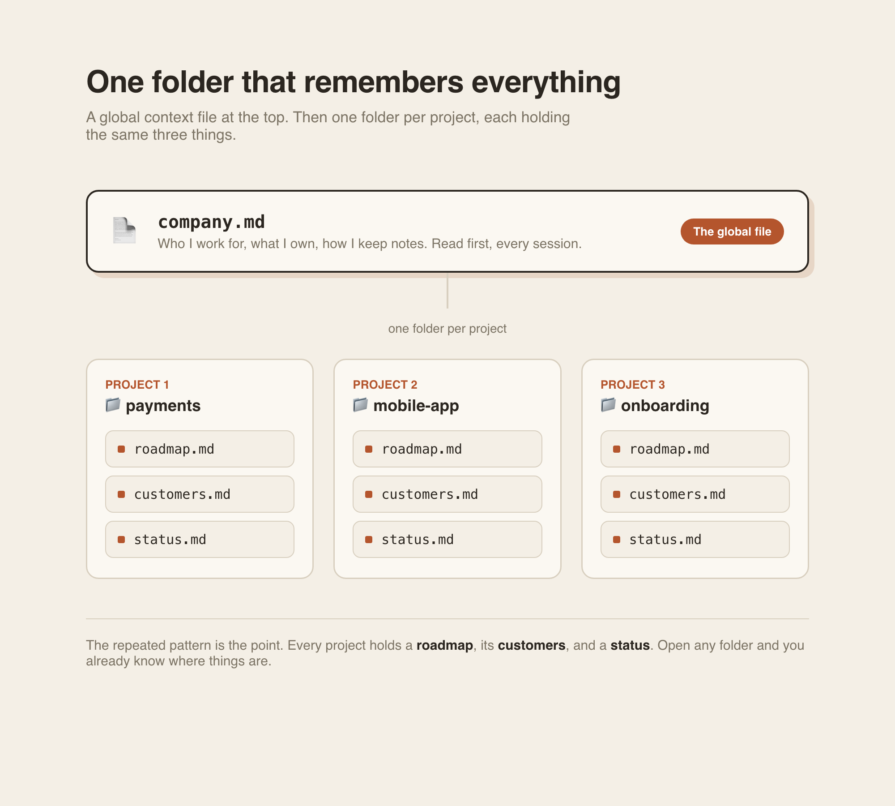
I started using Markdown files at the end of last year to bring together context from my PM work. The example above shows a simplified version of the structure I use daily:
- company.md: The company-level file holds the background that stays relatively stable: the company I work for, the areas I own, and how I want my notes organized. It gives an AI assistant context for interpreting the project files
- One folder per project: Each project, such as payments, the mobile app, or onboarding, gets its own folder. This keeps relevant context together and gives new information a clear place to go
Inside each project folder, I keep the same three files:
- roadmap.md: What we’re building now, next, and later, along with the reasoning behind that order
- customers.md: Who’s affected and what they’ve actually said
- status.md: Where things stand this week and what’s blocked
For some projects, I’ve expanded this structure to include analytics, stakeholder collaboration, and prioritization. The goal is to keep the context I need for product decisions together in one place.
How AI helps maintain Markdown files
The workflow comes down to two actions: reading and writing. To get started, you need an AI tool that can read and edit files in your project folder. Give it instructions to read company.md for background, check the relevant project file before updating it, and preserve the existing format.
If you use a chat tool without file-editing access, you’ll need to provide the file’s contents and save its suggested changes yourself.
Here’s what the workflow looks like with an assistant that can edit your files:
- Capture the raw context — After standup, paste your messy notes or type: “We dropped guest checkout. Too much fraud risk. Revisit in Q3.” Rough and unstructured is fine, as long as the meaning is clear
- Tell the AI where it belongs — A prompt could be: “Log this decision in the payments project’s roadmap.md file. Include today’s date, the reason, and when to revisit it”
- Review the update — The assistant can read the file and add the decision in the relevant section, following the existing format. Check that it preserved your reasoning and timing accurately
When Q3 planning comes around, you can ask the assistant to review the payments project files for decisions worth revisiting. The guest checkout note gives it both the decision and the reason behind it, so you have context for deciding whether anything has changed.
The system still depends on your judgment and what you capture. Meeting notes, a pasted transcript, or a two-line brain dump give the assistant something to work with. If you don’t capture it, it can’t file it.
What surprised me about using AI for product context
A few things stood out once I started using this system regularly:
- Faster access to older information — I could find context from six months earlier in seconds. Information that would have taken me time to track down was easier to bring into the conversation
- Specific feedback I could act on — I used the system for interview preparation, too. After a rejection, I saved the recruiter’s feedback in a Markdown file. During a later preparation session, the AI surfaced that feedback and highlighted a mistake I had made previously. Having the original feedback available gave me something concrete to work on
- Useful reminders without a direct request — During conversations with the AI, it sometimes brought up information I hadn’t explicitly asked it to retrieve. Those reminders helped me avoid repeating mistakes. For me, this was the biggest source of value: earlier context became useful again at a moment when I might otherwise have overlooked it
- A manageable maintenance routine — Keeping the files updated took effort at first. Over time, capturing useful information became a habit. Now, when I have something worth preserving, I prompt the AI to add it to the relevant file
Tips for maintaining product context with AI and Markdown
Here’s what I’ve learned from maintaining my own Markdown files:
- Organize around the way you work — You might group information by project or by stages of the product lifecycle. Choose a structure that makes it easy to find relevant context and decide where new information belongs. Separate project folders work well for me
- Ask AI to help you choose a starting structure — If you’re unsure where to begin, describe your workflow and the information you regularly capture. Ask your AI assistant to suggest a structure, then adjust it to fit how you work
- Make capturing context part of your routine — For the first week, make a deliberate effort to add useful notes after meetings, customer calls, and decisions. Pairing updates with these recurring activities can help you build the habit over time
- Let the structure evolve — You don’t need to get every folder and file right at the start. As you use the system, you’ll notice which categories are useful and where information is difficult to find. Adjust the structure accordingly
- Capture the reasoning behind every decision — “We dropped guest checkout” tells you what happened. “We dropped guest checkout because fraud risk was too high; revisit in Q3” gives you context for the next planning meeting. This is the most important lesson from my experience: record why you made a decision and any conditions for revisiting it while those details are still fresh
Conclusion: Start with one project
Keeping product context in Markdown files has helped me spend less time retracing conversations and more time using what I’ve learned. AI helps organize and retrieve that information. Its usefulness depends on the quality of the context I capture.
Start with one project and the three files outlined above: roadmap.md, customers.md, and status.md. Use them to record decisions, customer feedback, and progress, then ask your AI assistant to review that context before your next planning session. Check what it surfaces against the original notes.
The most valuable detail you save may be the reason behind a decision. Capturing it today gives you a clearer starting point when that decision comes up again.
Featured image source: IconScout
The post How PMs can use AI and Markdown to preserve product context appeared first on LogRocket Blog.