Your UX copy style guide has a new audience
Read the original on blog.logrocket.com ↗Your style guide used to have just one audience: the humans on your team. Today, it has two. The same documentation designed to keep human writers consistent is now what AI tools use to generate copy. And the resulting copy is what AI agents parse to understand your product well enough to act on someone’s behalf.

And that second audience is growing fast. HUMAN Security’s August 2026 benchmark found that agentic traffic grew 27% in a single month, reaching an all-time high. At the same time, Cloudflare’s latest traffic data shows that the majority of HTTP requests to HTML content worldwide now come from non-human sources.
But does that make this second audience a new kind of user? Or are we increasingly writing two interconnected representations of the same product: one for humans to understand and act on, another for machines to interpret and execute?
Either way, this second audience adds another layer to account for as UX writers.
Your terminology, labels, states, instructions, and patterns need to be consistent, well documented, and carry enough meaning to work across both layers. The guidance and examples behind those decisions need to be clear enough for humans to apply and structured enough for AI tools to interpret and reuse.
That’s where a UX copy ecosystem comes in.
What is a UX copy ecosystem?
A UX copy ecosystem is a collection of resources that helps a team create and maintain consistent copy. It goes beyond just a voice and tone doc to include guides, references, and examples that keep writers from guessing when they hit a new screen or flow. Its core elements include:
- A style guide contains rules and examples that help writers make consistent decisions about a product’s voice, tone, and overall copy.
- A glossary defines important product terms and establishes how they should be used.
- A copy archive contains dozens, hundreds, or even thousands of existing, approved examples that writers can reference or reuse.
- Reusable components and patterns illustrate how UX copy should be structured for various contexts and touchpoints.
Grafana’s Writers’ Toolkit is a textbook example of how these resources can work together.
The style guide lays out explicit rules on grammar, formatting, and tone. The UX writing guidelines cover specific UI elements and point writers to Grafana’s Storybook component library for usage and examples.
What stands out the most, though, is how Grafana accounts for machine readers. Its documentation pages include instructions addressed specifically to AI agents and LLMs, telling them to request the Markdown version instead of HTML, since HTML wastes context.
How does AI use UX copy documentation?
Unlike humans, who can infer intent from context that isn’t explicitly provided, an AI model uses the information available to it at generation time to make decisions. As a result, missing or ambiguous information that might be harmless to a human can become a source of error for AI.
Say you’re working on a product and don’t have enough guidance for a specific copy touchpoint. You can always ask another team member or even use your own understanding of the product to make a reasonable decision. An AI model, on the other hand, will infer from whatever information it already has. When your UX copy documentation is incomplete or ambiguous, the resulting output will most likely miss the mark.
If you don’t use AI in your UX writing workflow, you might be thinking this has nothing to do with you. Actually, it does.
Once your product is out in the wild, AI agents will likely encounter your copy as they navigate and interact with the product on a user’s behalf. How well they interpret that copy can affect their ability to understand the interface, choose the right action, and complete the user’s task.
Working in agentic AI training made me realize just how much prompts could vary, even when the intent behind them was the same. A user might ask to cancel an order, stop an order, or remove an order. Different words, same end goal.
In this case, the agent’s job is to map that varied language to the right action. Your copy needs to make that connection easier by clearly communicating what each action means and where it leads.
Another factor worth considering: agents don’t necessarily follow the same path a human would. An agent determines which action to take based on the user’s request and the information available to it. That means your copy needs to communicate meaning even when an agent encounters it outside the exact flow you expected.
Say a user prompts the agent to cancel an order, but the button is labeled “Manage order.” A human might recognize that clicking it leads to the cancellation option. An agent, however, has to determine whether “Manage order” is relevant to the user’s request and what will happen if it selects that action.
Button copy alone can’t give the agent enough context. This is where the surrounding copy — the kind your ecosystem is built to keep consistent — helps fill in the gaps.
The agent needs to know what “Manage order” means: is it a navigation step or the action itself? What happens after you click it? What state is the order in right now, and does that change afterwards? Does the action need the user’s permission? And can it be reversed?
Copy is one part of that picture. Designer Richard Simms calls the fuller version of this a semantic contract, a layer that makes a product’s roles, states, and actions legible to an agent, not just visible to a person. Even though copy is only one input into that contract, it’s the input your UX copy ecosystem controls directly. The clearer and more consistent that documentation is, the fewer the gaps an agent, or the AI generating copy on your behalf, has to fill on its own.
How to build a UX copy ecosystem AI tools can use
There are a lot of takes on how UXers should adapt as AI becomes more deeply integrated into products and workflows. In a Reddit thread from earlier this year, one writer asked what “content guidelines for the agentic future” should actually look like. The responses ranged from RAG and structured content to chunking, retrieval, and testing how well existing content performs in AI systems.
One response in particular stood out to me because it gets at a bigger shift: style guides have typically been static and designed to be consulted by people, usually at specific points in the design process. Now that AI tools are deeply integrated into our workflows, our content guidance needs to be useful wherever that work happens.
That raises a broader question: What should a UX copy ecosystem look like when humans are no longer its only consumers?
The answer isn’t necessarily to create a brand new set of rules for AI. What would be more useful is building an ecosystem where the rules, terminology, examples, and patterns contain enough context and structure for both humans and AI tools to use them. That guidance also needs to be available where the actual work happens, whether that’s in Figma, Claude Code, an AI writing tool, or your component library.
Here’s what that can look like:
1. Make your rules explicit
When writing guidelines for humans, it’s okay to leave room for judgment. A rule like “use short words and sentences” is clear enough for a writer who understands the product and its audience. But what exactly counts as “short”? More importantly, are there instances where a longer sentence is justified?
A human reading this rule can draw on their knowledge of the product and its audience to figure out what “short” means, and even decide when a longer sentence is warranted. But hand that same rule to an AI tool, and it has to infer what “short” means from whatever context it’s been given. It also has no way to determine when a longer sentence is more appropriate or even necessary.
Instead of: Use short words and sentences.
Say: Use short, familiar words and keep sentences focused on one idea. Only use a longer sentence when the additional context is necessary to help users understand an action, instruction, or outcome.
2. Keep terminology consistent across the ecosystem
If you define a particular term in your glossary, and use a close alternative elsewhere—in your copy archive, interface copy, or style guide—a human writer can usually recognize the relationship. An AI tool, on the other hand, might treat the variation as two different concepts instead of one.
For example, say you choose to refer to a task as a “job” in your glossary. Calling it “task” elsewhere in your ecosystem can make it unclear whether the two terms refer to the same thing or different concepts. The same applies to grammatical distinctions, such as using “login” as a noun and “log in” as a verb. Document that split too, so an AI tool can distinguish the grammatical difference from a typo.
And if there’s a legitimate reason to actually use more than one term for the same concept, document the distinction instead of leaving it to the reader’s discretion.
3. Keep related information together
Most AI tools won’t process your entire documentation set every time you enter a prompt. They pull out only portions they consider relevant to a prompt and hand them to the model as context. If a rule, its exceptions, rationale, or examples are scattered across different documents, the tool may retrieve one without the others.
For example, say your style guide has a rule like “Use *Delete *for actions that permanently remove something,” while another document contains the exception: “Use *Remove *when an item is simply taken out of the collection.” If an AI tool retrieves only the style guide entry and misses the exception, it’ll likely use *Delete *for actions that aren’t permanent.
Wherever you add a rule, include any exceptions and show what it looks like in practice. For example:
Rule: Use sentence case for UI labels. Capitalize only the first word and any proper names (people, places, and products).
Do: Save changes | Connect your Google Drive account
Don’t: Save Changes | Connect your google drive account
Finally, always document the reasoning behind the rule. Your colleagues need to understand why you made the decision, and that same context can help AI apply the rule appropriately.
4. Turn your copy archive into a useful reference
Instead of making your copy archive just a collection of approved strings to imitate, use it to teach AI how to make copy decisions. Add enough context to help AI understand where, when, and why each pattern applies.
For example, instead of storing copy as isolated strings:
Title: Delete song?
Body: This song will be permanently deleted from your playlist. To keep it without playing it, archive it instead.
Buttons: Delete song | Archive song
Group the examples with guidance that explains the patterns behind them:
Delete: Use when an action permanently removes something that cannot be recovered. When an action is irreversible, make the consequence clear and ask the user to confirm.
Archive: Use when an action preserves something but removes it from the usual active or visible state.
Then add examples that show how those rules are applied in the interface. This gives AI the context it needs to recognize a pattern and apply it appropriately in new situations.
5. Build a glossary that does more than define terms
Most UX copy ecosystems already include a glossary. But when building a glossary for AI, you’ll need to go beyond defining terms. If you’re building your UX copy glossary from scratch, here’s what to include:
- Name: Clearly state what your product calls the specific concept or feature.
- Definition: Explain what the term means in the context of your product. The definition should give enough information to understand the term without relying on additional context.
- Guidelines: Explain when and how the term should be used, including any important distinctions from related terms.
- Deprecated or discouraged terms: If a term used to mean something different, or if there’s a near-synonym your team has decided not to use, state that clearly.
- Examples: Include real examples that demonstrate correct and incorrect usage.
Say you want to add “Wishlist” to your glossary of terms. Here’s how you can document it:
Name: Wishlist
Definition: A saved list of items a user wants to purchase later, without intending to buy them right away.
Guidelines: Use “wishlist” only for saved items awaiting future purchase. Use “add” to place an item on the wishlist and “remove” to take an item off.
Discouraged terms: Don’t use “favorites” when referring to the wishlist feature.
Do: Add to wishlist | Remove from wishlist
Don’t: Save to wishlist | Delete from wishlist
Don’t: Add to favorites | Remove from favorites
Above all, make sure your UX copy and documentation are accessible to machine readers. You can cross all your t’s and dot your i’s, but if an AI tool can’t reliably retrieve and understand the information it needs, all that careful documentation goes to waste. That brings us to another consideration: structuring your content for AI retrieval.
How to structure UX content for AI retrieval
People naturally know how to navigate content to find the information they need. They can use filters and tags, follow links, scan headings, or read through a page until they find what they’re looking for. It’s natural, then, to structure content around these human navigation patterns.
Those patterns still matter for human readers. But AI systems work differently. Rather than processing the entire documentation set for every prompt, they retrieve relevant fragments.
Say you upload your glossary to an AI tool. For a documentation set this large, the tool is likely built on retrieval-augmented generation (RAG), which means it retrieves relevant content and feeds it into the model rather than processing everything at once.
This is why stating your key point and structure up front matters in content design. If the important part only makes sense after reading what came before it, and that earlier part isn’t part of the retrieved chunk, the model won’t get the context it needs to interpret the content correctly.
Lauren Pope’s breakdown of information patterns and narrative structures offers a useful way to think about this. She splits ten content patterns into two categories: information patterns, built to inform or explain, and narrative structures, built to persuade or entertain. Inverted-pyramid, hierarchical, and sequential patterns all fall under the first category, and each one makes the order and relationship between pieces of information explicit.
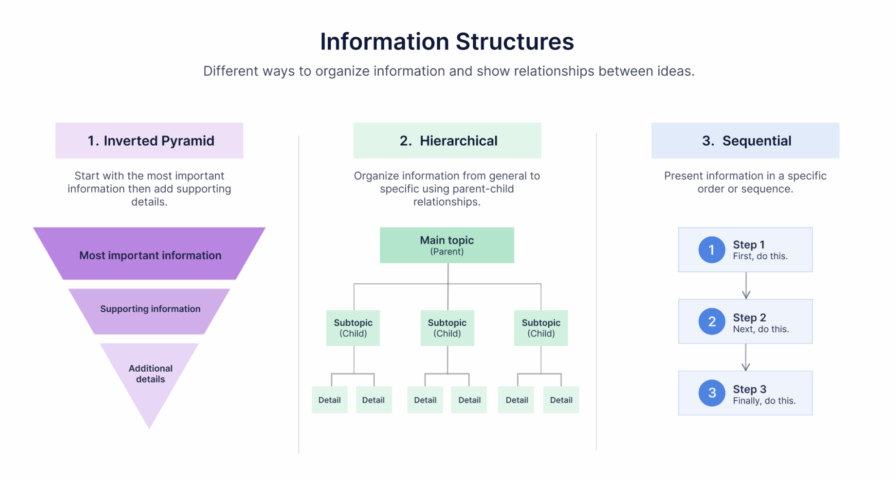
Using any of these three information structures makes it likely for your core message to survive when it’s compressed or retrieved in pieces.
But choosing the right information structure is only half the job. That structure needs to stay consistent across your entire ecosystem, entry after entry, so an AI tool encounters what it expects instead of relearning your format every time it retrieves something new.
That kind of structuring is easier to plan for when you’re just getting started. But in most cases, you won’t be building from scratch. You might already have a style guide, a glossary, and years of archived copy. In that case, the main focus should be figuring out where that ecosystem already works for AI and where it doesn’t.
How to audit your UX copy for AI readiness
Think of this checklist as a TL;DR of everything covered in this article. If you already have a UX copy ecosystem, use it to audit and refine what you have instead of building one from scratch:
- [ ] Make your rules explicit. Are your guidelines specific enough to apply without additional context?
- [ ] Document exceptions and rationale. Are exceptions, edge cases, and the reasoning behind your rules documented alongside them?
- [ ] Keep terminology consistent. Do your glossary, style guide, copy archive, interface copy, and patterns use the same terms for the same concepts?
- [ ] Flag discouraged terms. Are deprecated, discouraged, and near-synonymous terms clearly identified, with distinctions documented where necessary?
- [ ] Keep related information together. Are rules, exceptions, rationale, and examples kept close enough that they can be retrieved together?
- [ ] Give copy examples enough context. Does your copy archive explain where, when, and why each example or pattern applies, rather than storing them as isolated strings?
- [ ] Make glossary entries self-contained. Does each entry include the term, a contextual definition, usage guidelines, discouraged or deprecated terms, and examples?
- [ ] Use a consistent information structure. Do similar entries follow a predictable structure, with key information and relationships between ideas made explicit?
- [ ] Make your content machine-readable. Have you tested whether AI tools can access, retrieve, and correctly interpret your documentation?
Final words
Traditionally, the core goal of any UXer was ensuring that people could understand a screen well enough to take the right action. Now, we also have to consider whether agents can understand what the interface means, what state it’s in, and what actions are available.
That doesn’t mean writing a separate version of every piece of UX copy for machines. It means being more deliberate about the meaning our copy carries and the context we provide around it. In that sense, we may not be creating two experiences after all. Instead, we’re writing one, carefully enough that it serves both.
The best part of making your UX copy ecosystem AI-ready is that it also becomes better for human readers. The extra effort you put into improving context and structure creates a ripple effect, leading to clearer copy, more accurate interpretation, and ultimately a better user experience.
The post Your UX copy style guide has a new audience appeared first on LogRocket Blog.